Network and Cyber SecurityUnit 518 min read
Authentication Protocols: Kerberos, CHAP, OAuth, SAML, RADIUS, Biometrics
Unit 5 of Network and Cyber Security explores authentication protocols—how systems verify user identities securely. Learn Kerberos’ ticket-based logins, CHAP’s password hashing, OAuth’s token delegation, SAML’s XML assertions, RADIUS’ centralized access control, and biometric verification (fingerprint, retina). Include
What is Authentication?
Authentication is the process of verifying the identity of a user, device, or system before granting access to resources. Unlike authorization (which determines what an authenticated user can do), authentication answers who is requesting access. Strong authentication combines:
- Something you know (password, PIN)
- Something you have (smart card, OTP)
- Something you are (fingerprint, iris scan)
Why Protocols Matter
Authentication protocols define:
- How credentials are exchanged (e.g., over a network).
- How trust is established between parties (e.g., client ↔ server).
- How to prevent replay attacks, man-in-the-middle (MITM), or brute-force guesses.
1. Password-Based Protocols
CHAP (Challenge-Handshake Authentication Protocol)
How it works:
- A server sends a random challenge (e.g.,
0xA3F7) to the client. - The client hashes the challenge + its shared secret password (e.g., using MD5) and sends the hash back.
- The server repeats the hashing with its stored secret and compares results.
sequenceDiagram
    Server->>Client: Random Challenge (e.g., "0xA3F7")
    Client->>Server: Hash(Challenge + Password)
    Server->>Server: Verify Hash(Challenge + StoredSecret)
    alt Hashes match
        Server->>Client: Access Granted
    else Hashes differ
        Server->>Client: Access Denied
endAdvantages:
- Prevents replay attacks (challenges are one-time).
- No plaintext passwords transmitted.
- Lightweight (used in PPP, PPPoE).
Disadvantages:
- Vulnerable if the password database is compromised.
- MD5 is weak; modern CHAP uses SHA-256.
Real-World Use:
- Ncell’s 4G/5G authentication uses CHAP variants to verify SIM cards before granting mobile data access.
- eSewa’s login (for merchants) may use CHAP-like hashing to protect transaction credentials.
Worked Example:
Suppose the shared secret is "secret123" and the challenge is "0xA3F7".
Client computes:
MD5("0xA3F7" + "secret123") = "d41d8cd98f00b204e9800998ecf8427e"
Server does the same and grants access if it matches.
2. Ticket-Based Authentication: Kerberos
How it works (3-party model):
- Client requests a Ticket Granting Ticket (TGT) from the Key Distribution Center (KDC).
- KDC issues a TGT encrypted with the client’s secret key and a session key.
- Client uses the TGT to request a service ticket for a specific server (e.g., email).
- Server verifies the ticket with the KDC and grants access.
sequenceDiagram
    Client->>KDC: Authenticate (ID + Password)
    KDC->>Client: TGT (encrypted with ClientKey)
    Client->>Server: Request Service Ticket (TGT + ServerID)
    KDC->>Server: Verify Ticket
    Server->>Client: Grant Access
Key Components:
| Component | Role |
|---|---|
| KDC | Issues tickets; stores secrets of all users. |
| TGT | Temporary credential to request service tickets. |
| Session Key | Symmetric key for client-server communication. |
| Ticket | Encrypted data proving the client’s identity to the server. |
Advantages:
- No passwords transmitted over the network.
- Mutual authentication (client proves to server and server to client).
- Works in heterogeneous environments (Windows/Linux/macOS).
Disadvantages:
- Complex setup (requires a trusted KDC).
- Time synchronization is critical (tickets expire).
- Single point of failure: Compromising the KDC breaks the system.
Real-World Use:
- Microsoft Active Directory uses Kerberos for domain logins in corporate networks.
- MIT’s early campus network (1980s) pioneered Kerberos to secure email and file shares.
Worked Example:
- Alice logs into her university laptop (Kerberos realm
univ.edu). - KDC issues a TGT encrypted with Alice’s password hash.
- Alice requests access to the
mail.univ.eduserver. - KDC issues a service ticket encrypted with the mail server’s key.
- Mail server decrypts the ticket using its key and grants Alice access.
3. Delegated Authentication: OAuth 2.0
Problem: Sharing access without exposing passwords (e.g., "Log in with Google"). Solution: OAuth lets a client (e.g., a mobile app) obtain limited access to a resource server (e.g., Google Drive) via an authorization server (Google).
sequenceDiagram
    User->>Client: "Grant access to Google Drive"
    Client->>AuthServer: Request Authorization Code (redirect to Google)
    AuthServer->>User: "Approve?" (Consent Screen)
    User->>AuthServer: Approve
    AuthServer->>Client: Authorization Code
    Client->>AuthServer: Exchange Code for Access Token
    AuthServer->>Client: Access Token + Refresh Token
    Client->>ResourceServer: Access Resource (with Token)
Key Terms:
| Term | Description |
|---|---|
| Authorization Code | Short-lived code exchanged for tokens. |
| Access Token | Grants limited access to resources (e.g., read-only files). |
| Refresh Token | Long-lived token to get new access tokens without re-authenticating. |
| Scopes | Defines permissions (e.g., drive.readonly, calendar.events). |
Advantages:
- No password sharing: Apps never see user credentials.
- Granular permissions: Users control what data/apps can access.
- Widely supported: Used by Google, Facebook, GitHub, and eSewa.
Disadvantages:
- Complex flow: Multiple redirects and tokens can confuse users.
- Token theft risk: If an access token is leaked, it can be misused until revoked.
- Not for high-security apps: OAuth is for delegation, not primary authentication.
Real-World Use:
- eSewa’s "Login with Facebook": Uses OAuth to let users link their Facebook accounts without sharing passwords.
- Google Workspace APIs: Apps like Trello use OAuth to read/write Google Calendar events.
- Pathao’s driver app: Uses OAuth to let drivers access their Ncell/NTC account data for payment.
Worked Example:
- You click "Log in with Google" on a third-party app.
- Google redirects you to its consent screen: "App X wants to see your emails."
- You approve → Google gives the app an authorization code.
- App exchanges the code for an access token (e.g.,
ya29.a0Ae...). - App uses the token to fetch your Gmail data from Google’s API.
4. XML-Based Authentication: SAML (Security Assertion Markup Language)
Problem: Single Sign-On (SSO) across multiple services (e.g., login once to access email, CRM, and HR systems). Solution: SAML uses XML assertions to pass authentication data between an Identity Provider (IdP) and Service Providers (SP).
sequenceDiagram
    User->>SP: Request Access (e.g., HR Portal)
    SP->>IdP: "Is this user authenticated?" (SAML AuthnRequest)
    IdP->>User: Redirect to Login Page
    User->>IdP: Credentials
    IdP->>SP: SAML Response (Assertion)
    SP->>User: Grant Access
SAML Message Types:
| Type | Direction | Purpose |
|---|---|---|
| AuthnRequest | SP → IdP | Asks IdP to authenticate the user. |
| AuthnResponse | IdP → SP | Contains user identity and attributes (e.g., email, roles). |
| LogoutRequest | SP/IdP → Other | Terminates sessions across all services. |
Advantages:
- SSO: One login for multiple apps (e.g., Microsoft 365, Salesforce).
- Federation: Works across organizational boundaries (e.g., university ↔ external partners).
- Standardized: XML-based, widely supported (Shibboleth, ADFS).
Disadvantages:
- Complex XML parsing: Error-prone for developers.
- No built-in encryption: Relies on TLS for transport security.
- Slow adoption in Nepal: Mostly used in corporate/edu sectors (e.g., Tribhuvan University portals).
Real-World Use:
- Tribhuvan University’s student portal: Uses SAML for SSO between exam results, library, and email systems.
- Global example: Okta or Azure AD as IdP for companies using SAML to connect to Slack, Zoom, etc.
Worked Example:
- You log into
hr.univ.edu(SP). - SP sends a
SAML AuthnRequesttoidp.univ.edu(IdP). - IdP redirects you to a login page → you enter credentials.
- IdP sends a
SAML AuthnResponseback to SP, containing:<saml:Subject> <saml:NameID>student123@univ.edu</saml:NameID> </saml:Subject> <saml:AttributeStatement> <saml:Attribute Name="Role" NameFormat="urn:oasis:names:tc:xacml:1.0:role:attribute"> <saml:AttributeValue>Student</saml:AttributeValue> </saml:Attribute> </saml:AttributeStatement> - SP grants access to your HR dashboard.
5. Centralized Authentication: RADIUS
Problem: Managing authentication for many network devices (e.g., Wi-Fi, VPNs) from a single server. Solution: Remote Authentication Dial-In User Service (RADIUS) acts as a broker between clients (e.g., routers) and authentication databases.
sequenceDiagram
    Client->>RADIUS: Access-Request (Username + Password)
    RADIUS->>AuthServer: Verify Credentials (e.g., LDAP/Active Directory)
    AuthServer->>RADIUS: Access-Accept/Reject
    RADIUS->>Client: Access-Accept (with Vendor-Specific Attributes)
Key RADIUS Messages:
| Message | Direction | Purpose |
|---|---|---|
| Access-Request | Client → RADIUS | Username/password + NAS-ID (e.g., Wi-Fi router). |
| Access-Accept | RADIUS → Client | Grants access; may include IP assignment or VLAN info. |
| Access-Reject | RADIUS → Client | Denies access (e.g., wrong password). |
| Accounting-Request | Client → RADIUS | Logs session duration, bytes used (for billing). |
Advantages:
- Centralized management: One RADIUS server for all network devices.
- Scalable: Handles thousands of concurrent users (e.g., university Wi-Fi).
- Extensible: Supports vendor-specific attributes (e.g., assigning a VLAN based on user role).
Disadvantages:
- UDP-based: No retransmission → packets can be lost.
- Plaintext passwords by default: Must use TLS (RADIUS over TLS) to encrypt traffic.
- Complex configuration: Requires careful NAS (Network Access Server) setup.
Real-World Use:
- NTC’s Wi-Fi hotspots: Uses RADIUS to authenticate users before granting internet access.
- Corporate VPNs: RADIUS verifies remote users before allowing access to internal networks.
- Nepal Police’s secure network: RADIUS manages authentication for officers accessing sensitive databases.
Worked Example:
- You connect to
eduroamat IOE Campus. - Your laptop sends a RADIUS
Access-Requestto the university’s RADIUS server with your@ioe.edu.npcredentials. - RADIUS checks against Active Directory → grants access.
- RADIUS returns an
Access-Acceptwith:- Assigned IP:
10.0.0.5 - VLAN:
10(for students)
- Assigned IP:
- Your laptop gets an IP and joins the student VLAN.
6. Biometric Authentication
How it works: Uses unique physical traits to verify identity. Common methods:
- Fingerprint: Captures ridge patterns.
- Facial Recognition: Analyzes facial geometry.
- Iris/Retina Scan: High-resolution patterns in the eye.
- Voice Recognition: Analyzes vocal tract characteristics.
stateDiagram-v2
    [*] --> Enrollment
    Enrollment --> Capture: "Scan fingerprint"
    Capture --> StoreTemplate: "Save as binary template"
    StoreTemplate --> [*]
    [*] --> Authentication
    Authentication --> Capture: "Rescan fingerprint"
    Capture --> Compare: "Match with stored template"
    Compare --> GrantAccess: "Match > 95% confidence"
    Compare --> DenyAccess: "Match < 95% confidence"
    GrantAccess --> [*]
DenyAccess --> [*]Advantages:
- Hard to steal: Unlike passwords, biometrics can’t be shared.
- Fast: No need to type (e.g., unlocking a phone).
- High accuracy: Modern systems have <1% false rejection.
Disadvantages:
- False positives/negatives: Dirty fingers or poor lighting can fail.
- Privacy concerns: Biometric data is permanent and irreplaceable if leaked.
- Cost: High-quality sensors are expensive.
Real-World Use:
- Ncell’s fingerprint login: Used in Ncell’s mobile app for secure transactions.
- eSewa’s biometric payment: Merchants use fingerprint scanners to authorize transactions.
- Google Pixel’s unlock: Uses facial recognition + infrared sensors for secure access.
Worked Example:
- You open the Ncell app and place your finger on the scanner.
- The sensor captures ridge details and converts them into a template (not an image).
- The app compares the template to the stored one in Ncell’s database.
- If the match score > 98%, the app grants access to your account balance.
Comparison Table: Authentication Protocols
| Protocol | Use Case | Strengths | Weaknesses | Real-World Example |
|---|---|---|---|---|
| CHAP | Dial-up, PPP, PPPoE | Prevents replay attacks | Weak if password DB is compromised | Ncell 4G authentication |
| Kerberos | Enterprise networks (Windows/Linux) | No passwords in transit, mutual auth | Complex setup, time sync required | Microsoft Active Directory |
| OAuth 2.0 | Third-party app access | Delegated auth, no password sharing | Token theft risk, complex flow | eSewa "Login with Facebook" |
| SAML | SSO across services | XML-based, federated login | Slow, XML parsing errors | Tribhuvan University portals |
| RADIUS | Wi-Fi, VPN, network devices | Centralized, scalable | UDP (no retransmission), plaintext by default | NTC Wi-Fi hotspots |
| Biometrics | High-security access | Hard to steal, fast | Privacy risks, false rejects | Ncell fingerprint login |
In the Real World
eSewa’s Multi-Factor Authentication (MFA)
- What it uses: OAuth (for "Login with Facebook") + OTP (SMS) + Biometrics (fingerprint).
- How it works:
- You log in via Facebook OAuth → eSewa sends an OTP to your phone.
- You enter the OTP → place your fingerprint to complete the transaction.
- Why it matters: Prevents account takeovers even if your Facebook password is leaked.
Ncell’s SIM Authentication
- What it uses: CHAP (for initial SIM authentication) + Kerberos-like tickets for session management.
- How it works:
- When you insert a SIM, your phone and Ncell’s network exchange CHAP challenges to verify the SIM’s secret key.
- Once authenticated, your phone gets a session ticket to roam between towers without re-authenticating.
- Why it matters: Ensures only legitimate SIMs access the network, preventing fraud.
Google’s Account Recovery
- What it uses: OAuth (for third-party app access) + Biometrics (for device unlock) + SAML (for enterprise logins).
- How it works:
- If you forget your password, Google uses biometric prompts (e.g., "Your trusted phone is nearby") to verify identity.
- For business accounts, SAML integrates with Active Directory to reset passwords without IT intervention.
- Why it matters: Balances security with usability for millions of users.
Attack Scenarios and Mitigations
| Attack | How It Works | Mitigation Strategy |
|---|---|---|
| Replay Attack | Captures and replays old credentials. | Use one-time challenges (CHAP) or timestamps (Kerberos). |
| Man-in-the-Middle (MITM) | Intercepts credentials in transit. | Use TLS/SSL to encrypt all authentication traffic. |
| Brute Force | Tries all passwords until success. | Enforce strong passwords + account lockouts. |
| Token Theft | Steals OAuth access tokens. | Short-lived tokens + token revocation APIs. |
| Spoofing | Fakes SAML assertions or RADIUS messages. | Sign messages with digital certificates. |
| Biometric Spoofing | Uses fake fingerprints or photos. | Liveness detection (e.g., pulse checks). |
Exam Tip
What Examiners Look For
- Protocol Traces: Draw sequence diagrams for Kerberos/OAuth/SAML. Label every message and encryption step.
- Example: For Kerberos, show the TGT and service ticket flows separately.
- Real-World Mapping: Link protocols to Nepalese examples (e.g., "How does Ncell use CHAP?").
- Security Trade-offs: Compare protocols on scalability (RADIUS vs. Kerberos) and usability (OAuth vs. SAML).
- Attack Vectors: For each protocol, name one attack and one mitigation.
- Biometrics: Explain the difference between template storage (not raw images) and false acceptance rates (FAR).
Common Pitfalls
- Confusing OAuth with OpenID: OAuth is for delegation; OpenID is for authentication.
- Ignoring time synchronization: Kerberos fails if client/server clocks drift.
- Assuming RADIUS encrypts traffic: Default RADIUS uses UDP; always use RADIUS over TLS.
- Overlooking SAML’s XML complexity: Examiners may ask how to parse an assertion.
High-Score Strategies
- Draw diagrams: A well-labeled sequence diagram for Kerberos or OAuth can earn 5+ marks.
- Use tables: Compare protocols on use case, strengths, and weaknesses (as above).
- Relate to Nepal: Mention Ncell, eSewa, or TU portals to show practical understanding.
- Define key terms: For example, explain mutual authentication in Kerberos vs. one-way auth in CHAP.
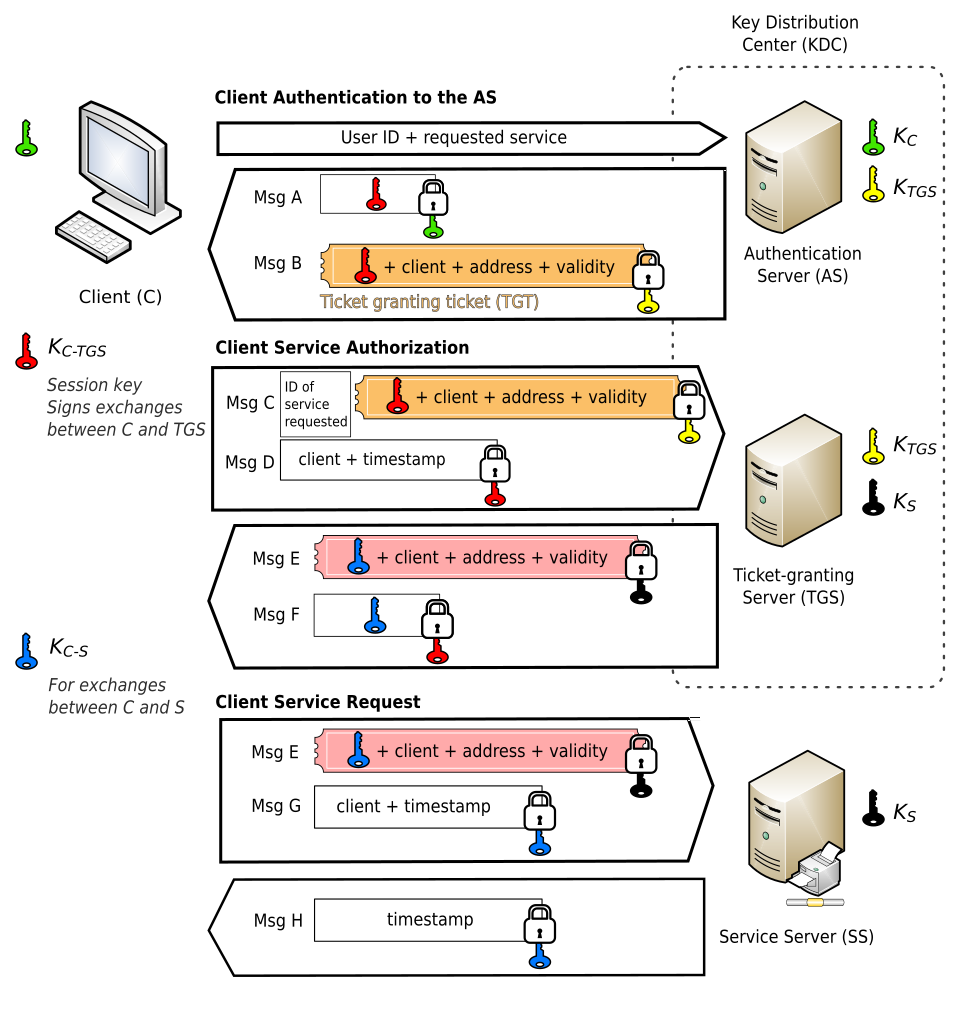 Kerberos ticket flow: client, KDC, and service server interactions (Image: Jeran Renz, CC BY-SA 4.0, via Wikimedia Commons)
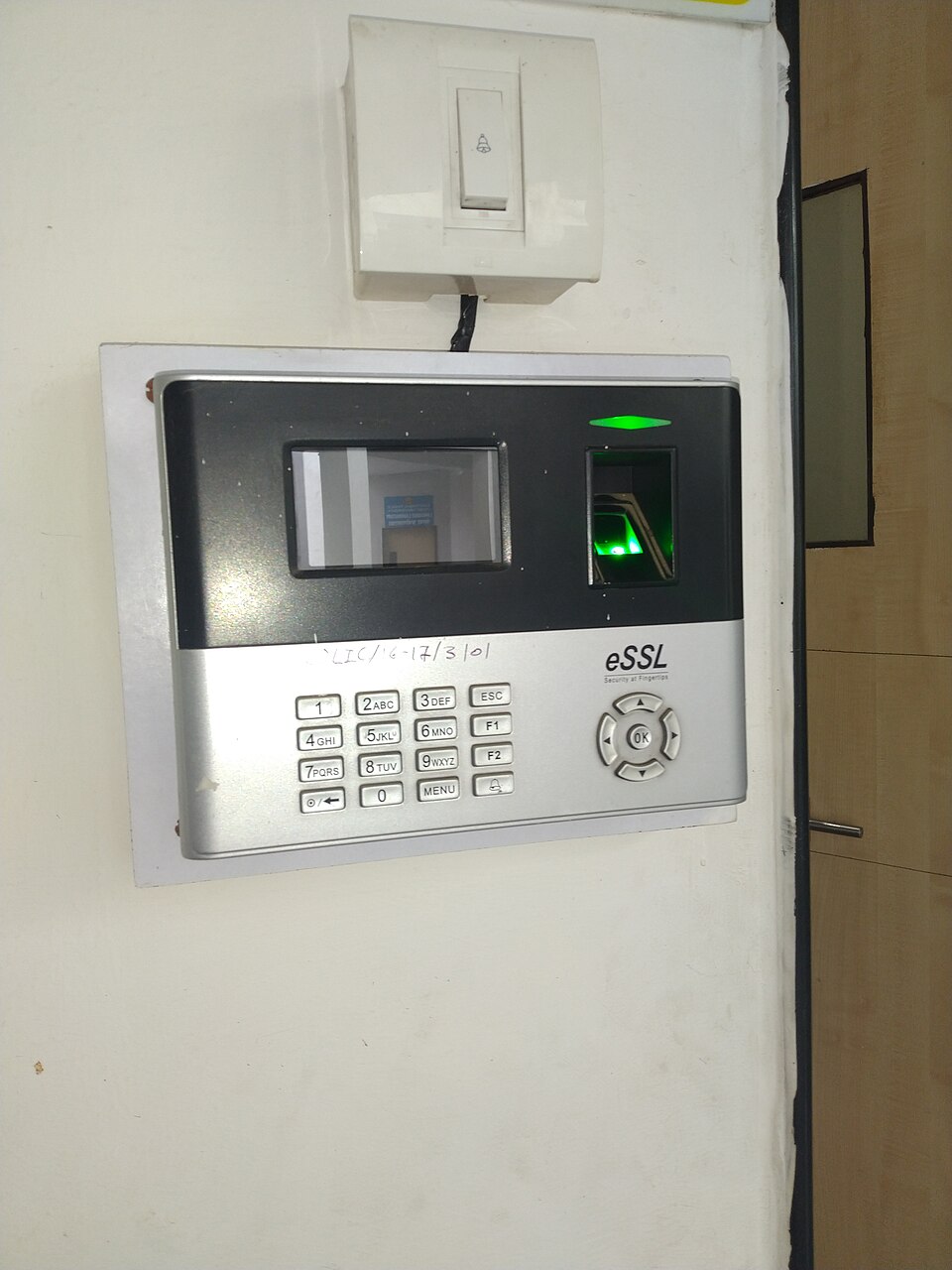 Cross-section of an optical fingerprint sensor (Image: Sanskritibharti1398, CC BY-SA 4.0, via Wikimedia Commons)
Based on the PU BE Computer (PU) syllabus for Network and Cyber Security (CMP426), unit 5.
Discussion
Loading…