Networking and System AdministrationUnit 67 min read
DNS & DHCP: Services, Protocols & Real-World Systems
Unit 6 of Networking and System Administration explores DNS (Domain Name System) and DHCP (Dynamic Host Configuration Protocol), covering their roles in resolving hostnames to IPs, automating IP assignment, and managing network resources—critical for modern internet services like eSewa, Daraz, and Ncell.
Core Concepts: DNS and DHCP Defined
DNS (Domain Name System)
DNS translates human-readable domain names (e.g., esewa.com.np) into machine-readable IP addresses (e.g., 103.12.123.45). Without DNS, users would memorize IPs like 172.217.160.46 for Google instead of typing google.com.
How DNS Works
DNS operates hierarchically, using a distributed database of name servers organized in zones. The process involves:
- Recursive Resolution: Your device queries a local DNS resolver (e.g., ISP’s DNS server).
- Iterative Queries: The resolver asks root servers → TLD (
.com,.np) servers → authoritative servers for the domain. - Caching: Responses are cached to speed up future requests.
sequenceDiagram
    participant User
    participant LocalDNS
    participant RootServer
    participant TLDServer
    participant AuthoritativeServer

    User->>LocalDNS: Query for esewa.com.np
    LocalDNS->>RootServer: .np?
    RootServer->>LocalDNS: Refer to TLD server
    LocalDNS->>TLDServer: .com.np?
    TLDServer->>LocalDNS: Refer to authoritative server
    LocalDNS->>AuthoritativeServer: esewa.com.np?
    AuthoritativeServer-->>LocalDNS: 103.12.123.45
    LocalDNS-->>User: 103.12.123.45
DNS Record Types
| Record Type | Purpose | Example |
|---|---|---|
| A | Maps domain to IPv4 | esewa.com.np → 103.12.123.45 |
| AAAA | Maps domain to IPv6 | google.com → 2607:f8b0:4009 |
| MX | Mail server for domain | esewa.com.np → mail.esewa.com |
| CNAME | Alias for another domain | www.esewa.com → esewa.com |
| NS | Authoritative name servers | esewa.com.np → ns1.esewa.com |
DHCP (Dynamic Host Configuration Protocol)
DHCP automates IP address assignment, reducing manual configuration. It provides:
- IP address
- Subnet mask
- Default gateway
- DNS server addresses
DHCP Operation (4-Way Handshake)
sequenceDiagram
    participant Client
    participant DHCPServer

    Client->>DHCPServer: DHCPDISCOVER (Broadcast)
    DHCPServer-->>Client: DHCPOFFER (Unicast)
    Client->>DHCPServer: DHCPREQUEST (Accept offer)
    DHCPServer-->>Client: DHCPACK (Confirm lease)
DHCP Lease Process
- Discovery: Client broadcasts
DHCPDISCOVERto find servers. - Offer: Server responds with
DHCPOFFER(proposed IP). - Request: Client accepts with
DHCPREQUEST. - Acknowledgment: Server confirms with
DHCPACK(orDHCPNAKif IP is invalid).
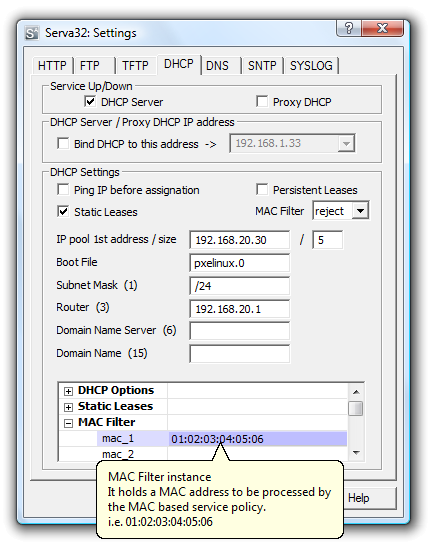 Screenshot of a DHCP scope setup in Windows Server or Linux (e.g., `isc-dhcp-server`), showing IP range, lease time, and exclusions. (Image: Patpat, CC BY-SA 3.0, via Wikimedia Commons)
In the Real World
eSewa (Nepal)
- Uses DNS to resolve
esewa.com.npto its web server IPs globally. - Relies on DHCP to assign dynamic IPs to its cloud servers (AWS/Azure) for scalability.
- Uses DNS to resolve
Ncell (Nepal)
- DHCP assigns IPs to mobile users when they connect to 4G/5G networks, ensuring no IP conflicts in crowded areas like Thamel.
Daraz (Global)
- DNS load balancing routes users to the nearest server (e.g.,
daraz.com.np→ Singapore or Dubai) for faster delivery tracking.
- DNS load balancing routes users to the nearest server (e.g.,
Worked Example: NTC’s DNS for Traffic Management
The Nepal Traffic Company (NTC) uses DNS to map ntc.gov.np to its servers hosting:
- Traffic camera feeds (A record →
192.0.2.100) - Ticket booking system (CNAME →
booking.ntc.gov.np) - Email alerts (MX record →
mail.ntc.gov.np)
If DNS fails, users can’t access real-time traffic updates or book tickets—causing delays like Kathmandu’s daily gridlock.
DNS vs. DHCP: Comparison
| Feature | DNS | DHCP |
|---|---|---|
| Primary Role | Name resolution (text → IP) | IP assignment (automation) |
| Protocol | UDP (Port 53) | UDP (Port 67/68) |
| Hierarchy | Distributed (root → TLD → authoritative) | Centralized (server pool) |
| Configuration | Static (zone files) | Dynamic (leases) |
| Example Use | Typing khalti.com |
Your laptop getting an IP at home |
DNS and DHCP in Linux Administration
Configuring DNS on Linux
- Edit
/etc/resolv.confto set DNS servers:nameserver 8.8.8.8 # Google DNS nameserver 1.1.1.1 # Cloudflare DNS - Install
bind9(BIND DNS server) for authoritative DNS:sudo apt install bind9
Configuring DHCP on Linux (ISC DHCP Server)
- Install the server:
sudo apt install isc-dhcp-server - Edit
/etc/dhcp/dhcpd.conf:subnet 192.168.1.0 netmask 255.255.255.0 { range 192.168.1.100 192.168.1.200; option routers 192.168.1.1; option domain-name-servers 8.8.8.8, 1.1.1.1; } - Restart the service:
sudo systemctl restart isc-dhcp-server
Security Considerations
DNS Attacks
DNS Spoofing (Cache Poisoning)
- Attacker injects false IP records into DNS cache (e.g., redirecting
khalti.comto a fake site). - Mitigation: Use DNSSEC (DNS Security Extensions).
- Attacker injects false IP records into DNS cache (e.g., redirecting
DDoS on DNS
- Overwhelming DNS servers (e.g.,
cloudflare.comDNS servers) to take down services. - Mitigation: Anycast routing (e.g., Cloudflare’s global DNS network).
- Overwhelming DNS servers (e.g.,
DHCP Attacks
Rogue DHCP Server
- Malicious server offers incorrect gateway/DNS, intercepting traffic.
- Mitigation: Disable DHCP on unused interfaces, use static IPs for critical devices.
IP Exhaustion
- DHCP server runs out of IPs, causing network outages.
- Mitigation: Monitor lease times, expand IP pools.
Exam Tip
- DNS Hierarchy: Always draw the root → TLD → authoritative flow in exams. Label each step (e.g., "Root server refers to
.npTLD"). - DHCP 4-Way Handshake: Memorize the DHCPDISCOVER → DHCPOFFER → DHCPREQUEST → DHCPACK sequence. Use it to explain how your laptop gets an IP at home.
- Record Types: Know A, AAAA, MX, CNAME, NS and their real-world uses (e.g.,
MXfor email routing in eSewa). - Linux Commands:
dig esewa.com.np(DNS lookup)nslookup google.com(Alternative todig)sudo dhclient(Request DHCP lease manually)
- Troubleshooting:
- DNS fails? Check
/etc/resolv.confand test withping 8.8.8.8(if ping works butping google.comfails, DNS is the issue). - DHCP fails? Verify
dhcpdlogs (/var/log/syslog) and firewall rules (port 67/68).
- DNS fails? Check
TAKEAWAYS:
- DNS translates names to IPs using a hierarchical, distributed system of root, TLD, and authoritative servers.
- DHCP automates IP assignment via a 4-way handshake, reducing manual configuration errors.
- DNSSEC and firewall rules are critical for securing DNS/DHCP against spoofing and exhaustion attacks.
- Linux tools like
bind9,isc-dhcp-server, anddigare essential for administering these services in real-world networks (e.g., Ncell’s DHCP for mobile users). - Real-world examples (eSewa’s DNS, NTC’s traffic systems) show how these protocols enable modern services—failures here cause outages like Kathmandu’s traffic jams.
Based on the TU BIM syllabus for Networking and System Administration (IT271), unit 6.
Discussion
Loading…