Networking and System AdministrationUnit 513 min read
Network Configuration: IP, Subnetting, Routing, Topologies & Troubleshooting
Unit 5 of Networking and System Administration covers IP addressing (IPv4/IPv6), subnetting techniques, routing protocols (static/dynamic), network topologies, and troubleshooting tools like ping, traceroute, and ipconfig. Learn how to configure interfaces, design efficient networks, and resolve connectivity issues wit
TAKEAWAYS:
- Understand IPv4/IPv6 addressing, subnetting (CIDR, VLSM), and how to calculate subnets, hosts, and default gateways.
- Differentiate between static routing (manual) and dynamic routing (RIP, OSPF, BGP) and their use cases.
- Recognize network topologies (star, bus, mesh, hybrid) and their pros/cons in real-world deployments (e.g., NTC’s fiber backbone vs. Pathao’s star topology).
- Master troubleshooting commands (
ping,traceroute,nslookup,ipconfig) and interpret their outputs. - Configure Linux/Windows interfaces (IP, subnet mask, gateway) and verify connectivity.
- Apply NAT (Network Address Translation) to conserve public IPs in scenarios like Daraz’s e-commerce servers.
1. IP Addressing: IPv4 and IPv6
1.1 IPv4 Basics
IPv4 uses 32-bit addresses divided into network and host portions. The division is defined by the subnet mask (e.g., 255.255.255.0 for /24).
- Private vs. Public IPs:
- Private:
10.0.0.0/8,172.16.0.0/12,192.168.0.0/16(used internally, e.g., home networks, corporate LANs). - Public: Assigned by IANA (e.g.,
8.8.8.8for Google DNS).
- Private:
- Example: A bank like Nabil Bank uses private IPs (
192.168.x.x) for internal systems but maps them to public IPs for internet-facing services (e.g., online banking).
classDiagram
    class IPv4 {
        +32-bit address
        +Divided by subnet mask
        +Private ranges: 10.0.0.0/8, 172.16.0.0/12, 192.168.0.0/16
        +Public ranges: Assigned by IANA
    }
    class IPv6 {
        +128-bit address
        +Hexadecimal notation (e.g., 2001:0db8::1)
        +No NAT needed (plentiful addresses)
        +Autoconfiguration (SLAAC)
    }
    IPv4 --> "Uses" SubnetMask
    IPv6 --> "Replaces" IPv4
1.2 IPv6: The Future
IPv6 uses 128-bit addresses, written in hexadecimal (e.g., 2001:0db8:85a3::8a2e:0370:7334).
- Advantages:
- No NAT required (eliminates address exhaustion).
- Built-in security (IPsec).
- Simplified header (faster routing).
- Example: Nepal Telecom (NTC) is gradually migrating its backbone to IPv6 to support future growth and IoT devices.
1.3 Subnetting: Dividing Networks
Subnetting splits a large network into smaller subnets for efficiency.
- Key Terms:
- CIDR Notation:
/24means 24 network bits (e.g.,192.168.1.0/24). - Subnet Mask: Binary representation of network bits (e.g.,
/24=11111111.11111111.11111111.00000000). - Boradcast Address: All host bits set to
1(e.g.,192.168.1.255). - Default Gateway: Router interface connecting subnets (e.g.,
192.168.1.1).
- CIDR Notation:
Worked Example: Subnetting 192.168.1.0/24
Problem: Subnet 192.168.1.0/24 into 4 equal subnets for a university’s 4 departments.
Solution:
- Borrow 2 bits (since subnets).
- New prefix:
/26(24 + 2). - Subnets:
192.168.1.0/26(dept A)192.168.1.64/26(dept B)192.168.1.128/26(dept C)192.168.1.192/26(dept D)
- Hosts per subnet: (10 host bits).
Real-World Tie: Tribhuvan University’s central IT department uses subnetting to isolate networks for faculties, libraries, and admin offices, improving security and performance.
2. Network Topologies
Topologies define how devices connect in a network. Choose based on cost, scalability, and fault tolerance.
| Topology | Description | Pros | Cons | Example |
|---|---|---|---|---|
| Star | All devices connect to a central hub/switch. | Easy to manage, fault isolation. | Single point of failure. | Pathao’s driver-app servers. |
| Bus | All devices share a single cable. | Low cost. | Difficult to troubleshoot. | Old Ethernet networks. |
| Ring | Devices connected in a circular loop. | Equal access, no collisions. | Failure disrupts entire ring. | Token Ring networks (obsolete). |
| Mesh | Every device connected to every other. | High redundancy. | Expensive, complex. | NTC’s fiber backbone. |
| Hybrid | Combination of topologies (e.g., star + bus). | Balanced performance. | Complex design. | Khalti’s payment gateway. |
graph LR
    A["Star Topology"] --> B["Central Switch"]
    C["Device 1"] --> B
    D["Device 2"] --> B
    E["Device 3"] --> B
Real-World Example:
- Daraz’s Order Processing: Uses a hybrid topology—star for internal servers (e.g., inventory, payments) and mesh for data centers across Kathmandu/Lalitpur for redundancy.
- Nepal’s Traffic Routes: Think of Kathmandu’s ring road as a ring topology (all roads connect in a loop), but with star connections (flyovers acting as hubs for local roads).
3. Routing: Static vs. Dynamic
Routing determines how data travels between networks.
3.1 Static Routing
- Manual configuration of routes by an admin.
- Use Case: Small networks (e.g., home router with 1-2 connections).
- Example Command (Linux):
ip route add 192.168.2.0/24 via 192.168.1.2 - Disadvantage: Must update manually if topology changes.
3.2 Dynamic Routing
Protocols automatically exchange routes between routers.
- RIP (Routing Information Protocol): Simple, but slow (max 15 hops).
- OSPF (Open Shortest Path First): Fast, hierarchical, used in large networks.
- BGP (Border Gateway Protocol): Used on the internet (e.g., between ISPs like NTC and Ncell).
sequenceDiagram
    participant RouterA as Router A
    participant RouterB as Router B
    RouterA->>RouterB: Hello (OSPF)
    RouterB-->>RouterA: Link State Advertisement (LSA)
    RouterA->>RouterB: ACK
    RouterA->>RouterB: Updated Routing Table
    Note over RouterA,RouterB: Dynamic routes calculated automatically.
Real-World Example:
- Nepal’s Internet Backbone: NTC and Ncell use BGP to exchange routes between their ISP networks, ensuring seamless connectivity across Nepal.
- WhatsApp’s Data Centers: Use OSPF internally to route messages between servers in Singapore, London, and São Paulo with minimal delay.
4. Network Configuration Commands
Master these commands to configure and troubleshoot networks.
| Command | Purpose | Example Output |
|---|---|---|
ping |
Test connectivity to a host. | Reply from 8.8.8.8: bytes=32 time=10ms |
traceroute |
Trace path to a destination. | 1 192.168.1.1 1ms |
ipconfig |
Display IP configuration (Windows). | IPv4 Address: 192.168.1.100 |
ifconfig |
Display IP configuration (Linux). | inet 192.168.1.100 netmask 255.255.255.0 |
nslookup |
Query DNS records. | Server: 8.8.8.8 |
netstat |
Show active connections/ports. | TCP 192.168.1.100:54320 8.8.8.8:53 |
Worked Example: Troubleshooting a Daraz Order Failure Scenario: A customer in Pokhara reports that their Daraz order isn’t processing. Steps:
- Ping the Daraz server:
ping daraz.com.np- If no reply, check internet connection or ISP (NTC/Ncell).
- If reply, proceed to step 2.
- Traceroute to identify bottlenecks:
traceroute daraz.com.np- Output shows delays at
10.0.0.1(NTC router in Kathmandu). This suggests a congestion issue on NTC’s backbone.
- Output shows delays at
- Check DNS resolution:
nslookup daraz.com.np- If DNS fails, the issue is with Cloudflare’s DNS servers (Daraz’s DNS provider).
Solution: Contact NTC support or switch to Ncell if NTC’s backbone is saturated.
5. NAT (Network Address Translation)
NAT allows multiple devices on a private network to share a single public IP.
- Types:
- PAT (Port Address Translation): Maps private IPs to public IP + port (used in home routers).
- Static NAT: One-to-one mapping (e.g., a web server’s private IP to a public IP).
- Example: Your home router uses PAT to let 10 devices (e.g., phones, laptops) access the internet via one public IP from NTC.
graph TD
    A["Private LAN\n(192.168.1.x)"] -->|"PAT"| B["Router"]
    B -->|"Public IP: 203.123.45.67"| C["Internet"]
Real-World Example:
- Khalti’s Payment Gateway: Uses static NAT to map its internal servers (e.g.,
10.0.0.10) to a fixed public IP (203.123.45.78) for secure transactions. - Your Smartphone: Uses PAT when connecting to Wi-Fi—your private IP (
192.168.1.10) is translated to your ISP’s public IP.
6. Configuring Interfaces (Linux/Windows)
Linux: Using ip or nmcli
# Assign IP to eth0
sudo ip addr add 192.168.1.100/24 dev eth0
sudo ip link set eth0 up

# Verify
ip a show eth0
Output:
2: eth0: <BROADCAST,MULTICAST,UP,LOWER_UP> mtu 1500 qdisc fq_codel state UP group default qlen 1000
    inet 192.168.1.100/24 brd 192.168.1.255 scope global dynamic eth0
Windows: Using ipconfig and GUI
- Open Network Connections (
ncpa.cpl). - Right-click adapter → Properties → IPv4 → Enter IP, subnet, gateway.
- Verify:
ipconfig /all
Real-World Example:
- Nepal Stock Exchange (NEPSE): Configures static IPs on trading servers (e.g.,
10.10.10.1/24) with a gateway to the internet (203.123.45.1) to ensure low-latency trading.
7. Network Troubleshooting Flowchart
flowchart TD
    A["Network Issue Detected"] --> B["Is device powered on?"]
    B -->|"No"| C["Power on device"]
    B -->|"Yes"| D["Check physical connections"]
    D -->|"Cable loose?"| E["Reseat cable"]
    D -->|"Yes"| F["Check IP configuration"]
    F -->|"Wrong IP/subnet?"| G["Reconfigure IP"]
    F -->|"Correct"| H["Ping gateway"]
    H -->|"No reply"| I["Check router/firewall"]
    H -->|"Reply"| J["Ping external host"]
    J -->|"No reply"| K["Check DNS/ISP"]
J -->|"Reply"| L["Issue resolved"]Example: Your laptop can’t access YouTube.
- Ping
8.8.8.8: Works → ISP is fine. - Ping
youtube.com: Fails → DNS issue. - Use
8.8.8.8as DNS: Works → Fix your router’s DNS settings.
In the Real World
eSewa’s Payment Routing:
- Uses static routing to direct transactions between its servers in Kathmandu and payment gateways (e.g., IME Pay, Global IME Bank). If a route fails, admins manually update tables.
- NAT: Maps eSewa’s internal servers (
10.0.x.x) to a public IP for secure HTTPS connections.
Pathao’s Driver Dispatch System:
- Star Topology: All driver apps connect to central Pathao servers in Thapathali. If the central server fails, no drivers can dispatch orders (single point of failure).
- Dynamic Routing: Uses OSPF-like logic to reroute orders to the nearest available server if a data center goes down.
NTC’s Fiber Backbone:
- Mesh Topology: NTC’s fiber optic cables connect major cities (Kathmandu, Pokhara, Biratnagar) in a mesh for redundancy. If one link fails (e.g., landslide in Dhulikhel), traffic reroutes automatically.
- IPv6 Deployment: NTC is rolling out IPv6 to support IoT devices (e.g., smart meters) without NAT overhead.
Exam Tip
Subnetting Questions:
- Always show binary conversion and subnet/broadcast/host calculations.
- Example: Given
172.16.0.0/20, calculate subnets and usable hosts. Draw a table:Subnet | Range | Usable Hosts -------------------------------------------- 172.16.0.0/20 | 172.16.0.1–172.16.15.254 | 4094
Routing Protocols:
- RIP: Max 15 hops, uses hop count as metric.
- OSPF: Uses cost (based on link speed), hierarchical (areas).
- BGP: Used between autonomous systems (e.g., NTC ↔ Ncell).
Troubleshooting:
- Step-by-step approach: Device → Cable → IP → Gateway → DNS → ISP.
- Commands: Know when to use
ping,traceroute,nslookup, andnetstat.
NAT/PAT:
- PAT: Many private IPs → one public IP + ports (e.g., home router).
- Static NAT: One-to-one (e.g., web server).
Topologies:
- Star: Easy to manage (e.g., corporate LANs).
- Mesh: Redundant (e.g., NTC backbone).
- Hybrid: Balanced (e.g., Daraz’s servers).
Common Pitfalls:
- Forgetting to exclude network/broadcast addresses when counting hosts.
- Confusing subnet mask (
255.255.255.0) with wildcard mask (0.0.0.255). - Misconfiguring default gateways (must be in the same subnet).
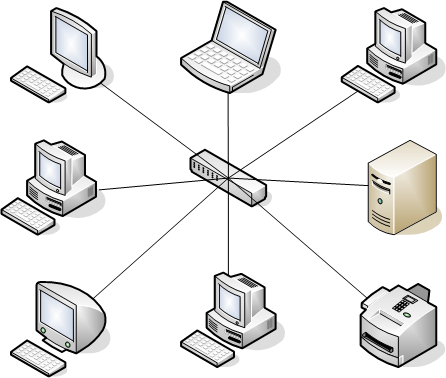 Pathao’s central server architecture. (Image: Umapathy, CC BY-SA 3.0, via Wikimedia Commons)
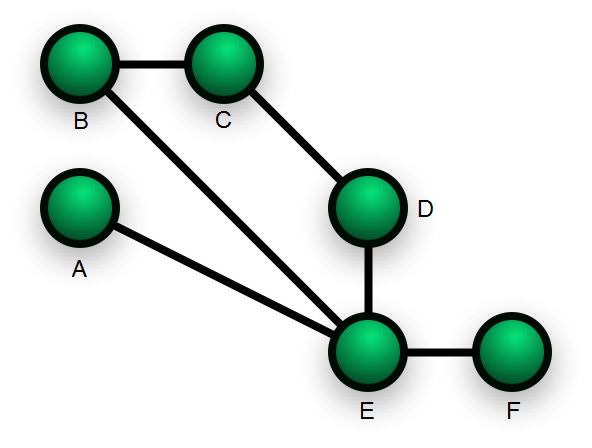 NTC’s fiber mesh connecting major cities. (Image: Simon Villeneuve, CC BY-SA 3.0, via Wikimedia Commons)
Based on the TU BIM syllabus for Networking and System Administration (IT271), unit 5.
Discussion
Loading…