Business Data Communication and NetworkingUnit 715 min read
Application Layer Services: Protocols, Services & Real-World Use
Unit 7 of Business Data Communication and Networking explores the application layer (Layer 7 of OSI/TCP/IP), covering protocols like HTTP/HTTPS, FTP, SMTP, DNS, DHCP, and VoIP, their functions, message formats, and real-world implementations in apps (e.g., WhatsApp, eSewa) and businesses (e.g., Ncell’s SMS gateway, Dar
Key Concepts & Structure of the Application Layer
The application layer is the topmost layer of the OSI model and the highest layer of the TCP/IP model. It provides network services directly to end-users (e.g., web browsing, email, file sharing) by defining protocols, data formats, and communication rules. Unlike lower layers (which handle routing, framing, or physical transmission), the application layer focuses on logical communication between software applications.
1. Role of the Application Layer
- Acts as an interface between user applications and the network.
- Defines protocols (rules for data exchange) like HTTP, FTP, SMTP.
- Ensures data is formatted correctly for transmission (e.g., HTML for web pages, MIME for emails).
- Manages session establishment, data transfer, and termination (e.g., opening/closing a WhatsApp chat).
2. Major Application Layer Protocols
The syllabus emphasizes six core protocols. Below is a comparison table with their purpose, port numbers, and real-world use:
| Protocol | Full Name | Port | Function | Example Use Case |
|---|---|---|---|---|
| HTTP | HyperText Transfer Protocol | 80 | Transfers web pages (text, images, videos) using stateless requests. | Loading Daraz product pages, eSewa payment gateways. |
| HTTPS | HTTP Secure | 443 | Encrypts HTTP traffic using TLS/SSL (e.g., for secure logins). | Online banking (Nabil Bank), WhatsApp Web. |
| FTP | File Transfer Protocol | 20/21 | Transfers files between client and server (e.g., uploading to a cloud). | Downloading firmware updates (NTC), transferring large files to a server. |
| SMTP | Simple Mail Transfer Protocol | 25 | Sends emails between servers (uses port 25 for outbound mail). | Sending emails via Gmail, Ncell’s SMS-to-email service. |
| POP3/IMAP | Post Office Protocol / Internet Message Access | 110/143 | Retrieves emails from a server (POP3 downloads; IMAP syncs). | Checking emails on mobile devices (Khalti notifications). |
| DNS | Domain Name System | 53 | Converts domain names (e.g., google.com) to IP addresses (e.g., 142.250.190.46). | When you type "eSewa.gov.np," DNS resolves it to the correct server IP. |
| DHCP | Dynamic Host Configuration Protocol | 67/68 | Automatically assigns IP addresses to devices on a network. | Your home Wi-Fi router assigns IPs to phones/laptops when you connect. |
| VoIP | Voice over IP | 5060 | Transmits voice/data over IP networks (replaces traditional phone lines). | Pathao driver calls, Ncell’s VoIP services. |
3. How Protocols Work: Step-by-Step Traces
A. HTTP/HTTPS Request-Response Cycle
When you visit Daraz.com, this happens:
- Your browser sends an HTTP GET request to Daraz’s server (e.g.,
GET /product/smartphone HTTP/1.1). - The server processes the request and sends back an HTTP response (status code + data, e.g.,
200 OK+ HTML page). - The browser renders the page using HTML/CSS/JS.
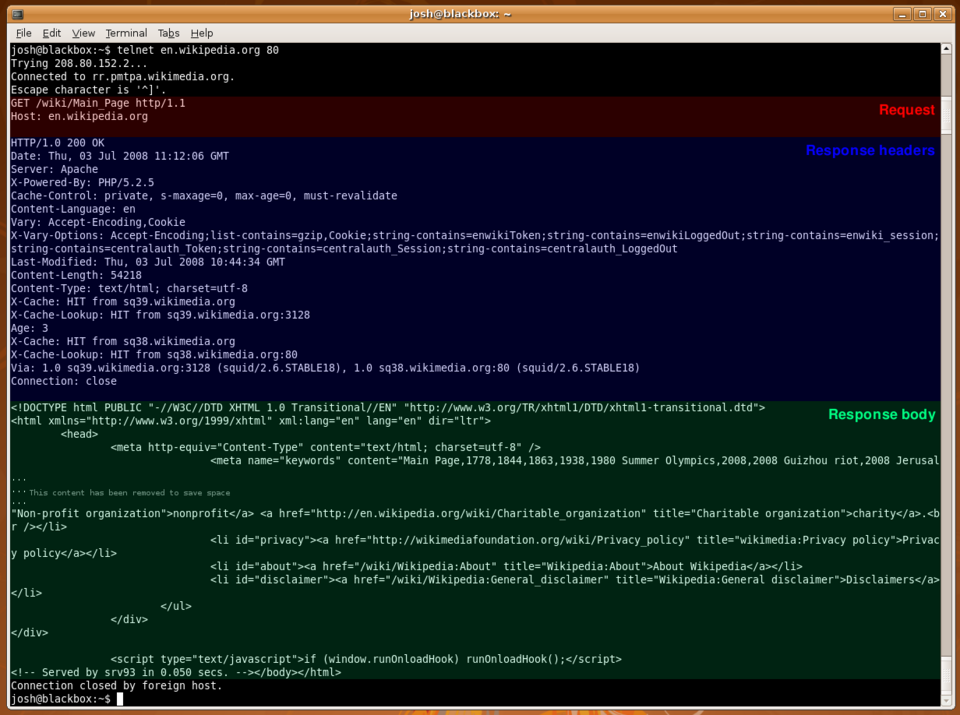 Show a sample GET request/response with headers like `Host`, `User-Agent`, `Content-Type` (Image: TheJosh, Public domain, via Wikimedia Commons)
WORKED EXAMPLE: Loading a Web Page
- Step 1: You type
https://daraz.com→ Browser checks DNS cache (or queries DNS if not cached). - Step 2: DNS resolves
daraz.comto an IP (e.g.,103.245.222.77). - Step 3: Browser initiates TLS handshake (for HTTPS) to encrypt the connection.
- Step 4: Browser sends HTTP GET for the homepage → Server responds with HTML + CSS/JS files.
- Step 5: Browser loads images/videos via parallel HTTP requests (modern browsers use HTTP/2 or HTTP/3 for efficiency).
Why HTTPS?
- Encrypts data to prevent man-in-the-middle attacks (e.g., hackers intercepting your Khalti login).
- Uses TLS/SSL certificates (issued by authorities like Let’s Encrypt) to verify server identity.
B. Email System: SMTP + POP3/IMAP
Flowchart of Email Delivery:
flowchart LR
    A["Sender's Email Client\n(e.g., Gmail)"]
    B["SMTP Server\n(e.g., Gmail SMTP: smtp.gmail.com:25)"]
    C["MX Record Lookup\n(DNS finds recipient's mail server)"]
    D["Recipient's Mail Server\n(e.g., Ncell's SMTP server)"]
    E["Recipient's Inbox\n(POP3/IMAP retrieves emails)"]
    F["Recipient's Email Client\n(e.g., Outlook, Thunderbird)"]

    A -->|"SMTP: MAIL FROM, RCPT TO"| B
    B -->|"DNS Query"| C
    C -->|"Finds MX Record"| D
    D -->|"Stores Email"| E
    E -->|"POP3/IMAP: RETR, LIST"| F
WORKED EXAMPLE: Sending an Email via Ncell
- You compose an email in Ncell’s webmail → Client sends
HELOto Ncell’s SMTP server. - SMTP server verifies your credentials → Sends
MAIL FROM: <your@ncell.com>. - Recipient’s domain (e.g.,
@gmail.com) is resolved via DNS MX record. - Ncell’s SMTP forwards the email to Gmail’s server → Gmail stores it in your inbox.
- You check your email on a phone → IMAP syncs the message to your device.
Key Terms:
- MX Record: A DNS entry pointing to the mail server for a domain (e.g.,
gmail.comhasMX: gmail-smtp-in.l.google.com). - SPF/DKIM: Anti-spam protocols to verify sender authenticity (used by banks to prevent phishing).
C. DNS: How Domain Names Work
Trace: Typing eSewa.gov.np
- Your device checks its local DNS cache (or router cache).
- If not found, it queries the root DNS server (
.). - Root server redirects to
.np(Nepal’s TLD) server. .npserver points togov.npauthoritative server.gov.npserver resolveseSewa.gov.npto IP: 103.245.222.123.- Your browser connects to the IP and loads the page.
Why DNS Matters in Nepal:
- NTC’s website (ntc.net.np) relies on DNS to route users to its servers.
- NEPSE (nepse.com.np) uses DNS to handle high traffic during stock market hours.
- Khalti’s payment gateway (khalti.com) needs DNS to direct users to secure servers.
4. Wireless and Mobile Application Services
The application layer also supports mobile-specific services:
- SMS/MMS: Uses SMPP (Short Message Peer-to-Peer) protocol (port 2775).
- Example: Ncell sends an SMS alert for low balance via its SMPP gateway.
- WhatsApp/Telegram: Uses XMPP (Extensible Messaging and Presence Protocol) for messaging.
- Mobile Banking (eSewa, Nabil Bank): Uses HTTPS + OAuth for secure transactions.
Comparison: SMS vs. VoIP for Notifications
| Feature | SMS (Ncell) | VoIP (Pathao Driver Calls) |
|---|---|---|
| Protocol | SMPP (port 2775) | SIP/RTP (VoIP) |
| Delivery | Guaranteed (but delayed in congestion) | Real-time (but requires internet) |
| Use Case | Bank OTPs, weather alerts | Driver-passenger communication |
| Cost | Paid per SMS (NPR 0.50–2.00) | Free (if data is available) |
5. Case Study: How Daraz Uses Application Layer Services
Daraz’s e-commerce platform relies on multiple application-layer protocols to function:
HTTP/HTTPS:
- Users browse products via secure connections (HTTPS for payments).
- Example: When you add an item to cart, Daraz’s server responds with a
302 Redirectto the checkout page.
DNS:
- Daraz’s global traffic is routed via anycast DNS (multiple servers respond to
daraz.combased on user location).
- Daraz’s global traffic is routed via anycast DNS (multiple servers respond to
FTP/SFTP:
- Daraz uses SFTP (Secure FTP) to upload product images/videos to their CDN (Content Delivery Network).
WebSockets (Real-Time Updates):
- Live order tracking uses WebSocket (port 80/443) to push updates to users without refreshing the page.
Mermaid Diagram: Daraz’s Tech Stack
mindmap
  root((Daraz's Application Layer))
    HTTP/HTTPS
      Secure Checkout
      Product Pages
    DNS
      Global Routing
      Failover Servers
    FTP/SFTP
      Product Uploads
      CDN Integration
    WebSockets
      Live Order Tracking
      Chat Support
    APIs
      Payment Gateways (Khalti, IPS)
      Third-Party Integrations
6. Advantages and Limitations of Application Layer Protocols
| Protocol | Advantages | Limitations |
|---|---|---|
| HTTP | Simple, stateless, widely supported. | No encryption (use HTTPS instead). |
| FTP | Fast for large file transfers. | Insecure (uses plaintext; SFTP/FTPS are better). |
| SMTP | Standard for email delivery. | Spam vulnerabilities (requires SPF/DKIM). |
| DNS | Human-readable domain names. | Single point of failure (DNS cache poisoning attacks). |
| DHCP | Automates IP assignment (saves manual config). | IP conflicts if misconfigured. |
| VoIP | Cost-effective for long-distance calls. | Requires stable internet; latency issues in poor networks. |
7. Security in the Application Layer
Application-layer attacks exploit protocol weaknesses:
- Phishing: Fake login pages (e.g.,
khalti-fake.commimickingkhalti.com). - DNS Spoofing: Redirects users to malicious sites (e.g.,
ntc.gov.np→ fake login page). - MITM Attacks: Intercepts unencrypted HTTP traffic (solved by HTTPS).
- SMTP Spoofing: Fake sender emails (e.g., "From: support@nabilbank.com" but not).
How to Secure Application Layer Services:
| Protocol | Security Measure | Example |
|---|---|---|
| HTTP | Upgrade to HTTPS (TLS/SSL). | All banking sites (Nabil Bank, Global IME) use HTTPS. |
| FTP | Use SFTP/FTPS (encrypted). | NTC uploads firmware via SFTP. |
| SMTP | Enable SPF, DKIM, DMARC. | Gmail uses DKIM to verify sender emails. |
| DNS | DNSSEC (digital signatures). | Root DNS servers use DNSSEC to prevent spoofing. |
| VoIP | SRTP (Secure RTP) for encrypted calls. | Pathao uses SRTP for driver-passenger calls. |
In the Real World
eSewa’s Payment Gateway
- Uses HTTPS (TLS 1.3) to encrypt transactions between your phone and eSewa’s servers.
- Relies on DNS to route users to the nearest server (reducing latency).
- Implements OAuth 2.0 for secure login via Facebook/Khalti.
Ncell’s SMS and VoIP Services
- SMPP Protocol: Ncell’s SMS gateway uses SMPP to send bulk OTPs/alerts to millions of users.
- VoIP for Customer Support: Ncell’s IVR system uses SIP (Session Initiation Protocol) to route calls to agents.
Daraz’s Order Tracking System
- Uses WebSockets to push real-time updates (e.g., "Your order #12345 is out for delivery").
- DNS Load Balancing: Distributes traffic across multiple servers in Kathmandu, Delhi, and Dubai.
NTC’s Website and Firmware Updates
- HTTPS: Ensures secure downloads of firmware updates for NTC’s network devices.
- FTP/SFTP: Technicians use SFTP to upload configuration files to NTC’s routers.
WhatsApp’s End-to-End Encryption
- Uses a custom application-layer protocol (based on Signal Protocol) to encrypt messages before they leave your device.
- Relies on XMPP for message routing between servers.
Exam Tip
What Examiners Look For
Protocol Definitions:
- Know the full name, port, and purpose of HTTP, FTP, SMTP, DNS, DHCP, and VoIP.
- Example Question: "Explain how DNS resolves a domain name with a diagram." Answer: Draw a DNS lookup flowchart (root → TLD → authoritative) and mention TTL (Time to Live).
HTTP/HTTPS Workings:
- Explain request/response headers, status codes (200, 301, 404, 500), and TLS handshake.
- Example Question: "Trace the steps when you load https://esewa.com.np." Answer: Include DNS lookup → TLS handshake → HTTP GET → server response.
Email Protocols (SMTP + POP3/IMAP):
- Differentiate between SMTP (sending), POP3 (download), and IMAP (sync).
- Example Question: "Why does Gmail use IMAP instead of POP3?" Answer: IMAP syncs emails across devices; POP3 downloads and deletes from the server.
Security Measures:
- Link protocols to real-world attacks (e.g., DNS spoofing → fake NTC login page).
- Example Question: "How would you secure an FTP server?" Answer: Use SFTP (SSH-based) or FTPS (TLS) instead of plain FTP.
Case Studies:
- Be ready to apply protocols to Nepali companies (e.g., "How does Daraz use WebSockets?").
- Example Question: "Explain the role of DNS in NEPSE’s website."
Answer: DNS resolves
nepse.com.npto the correct server IP; anycast DNS ensures low latency for traders.
Diagrams and Comparisons:
- Always draw:
- HTTP request/response headers (show
Host,User-Agent,Content-Type). - DNS lookup hierarchy (root → TLD → authoritative).
- Email flow (SMTP → MX record → POP3/IMAP).
- HTTP request/response headers (show
- Tables: Compare protocols (ports, use cases, security).
- Always draw:
Common Mistakes to Avoid
- Mixing OSI/TCP layers: The application layer is Layer 7 (OSI) and the top layer in TCP/IP (though TCP/IP doesn’t number layers).
- Ignoring ports: Always mention port numbers (e.g., HTTP:80, HTTPS:443, SMTP:25).
- Overlooking security: Examiners love questions on HTTPS vs. HTTP or SFTP vs. FTP.
- Vague answers: Instead of "DNS converts names to IPs", say:
"DNS performs a hierarchical lookup starting from the root DNS server, querying TLD servers (e.g.,
.np), then authoritative servers to resolveesewa.gov.npto an IP address (e.g.,103.245.222.123). Caching at local resolvers improves efficiency."
Practice Questions for Self-Assessment
Short Answer:
- What is the difference between POP3 and IMAP? Give an example of when you’d use each.
- Why does WhatsApp use end-to-end encryption at the application layer instead of relying on TLS?
Diagram-Based:
- Draw a flowchart showing how an email travels from your Gmail account to a recipient’s Ncell inbox.
- Sketch an HTTP GET request for loading
https://khalti.comand list 5 headers you’d expect.
Scenario-Based:
- A user reports that
ntc.net.nploads slowly. Explain three possible application-layer causes and how to fix them. - How would you secure a FTP server used by NTC to distribute firmware updates?
- A user reports that
Case Study:
- Pathao’s VoIP system uses SIP for driver-passenger calls. Explain how SIP works and why it’s better than traditional phone lines for Pathao’s business model.
Based on the TU BITM syllabus for Business Data Communication and Networking (IT240), unit 7.
Discussion
Loading…