Networking and System AdministrationUnit 114 min read
System Admin: Roles, Tasks & OS Fundamentals
Unit 1 of Networking and System Administration introduces the core responsibilities of a system administrator, the three main types of operating systems, and how they manage hardware, software, and users—essential for configuring and maintaining IT infrastructure in real-world environments like banks, e-commerce platfo
What is System Administration?
System administration (sysadmin) is the management and maintenance of computer systems and networks to ensure smooth operation, security, and efficiency. Sysadmins perform tasks such as:
- Installing, configuring, and troubleshooting hardware/software.
- Managing user accounts and permissions.
- Monitoring system performance and security.
- Automating repetitive tasks (e.g., backups, updates).
- Ensuring data integrity and disaster recovery.
The Three Pillars of System Administration
Every sysadmin role revolves around three core areas:
| Pillar | Key Responsibilities | Example Tasks |
|---|---|---|
| Hardware Management | Overseeing servers, desktops, storage, and networking devices. | Installing RAM, configuring RAID arrays, replacing faulty hard drives. |
| Software Management | Deploying, updating, and patching OS and applications. | Installing Linux/Windows, managing software licenses, automating updates. |
| User & Security Management | Controlling access, permissions, and system security. | Creating user accounts, setting firewalls, enforcing password policies. |
Types of Operating Systems (OS)
Operating systems act as intermediaries between hardware and software. The three main types are:
1. Batch Operating System
- Definition: Executes jobs in non-interactive batches (predefined sequences).
- How it works:
- Jobs are grouped into batches and submitted to the OS.
- The OS processes them sequentially without user intervention.
- Output is generated after all jobs complete.
- Example Workflow:
User → Job Submission → OS Scheduler → CPU Execution → Output Generation - Advantages:
- Efficient for large-scale, repetitive tasks (e.g., payroll processing).
- Minimal user interaction required.
- Disadvantages:
- No real-time processing (slow for interactive tasks).
- No error handling during execution (jobs fail silently).
- Real-World Use:
- Old mainframe systems (e.g., legacy banking transaction processing).
- Automated backup scripts running overnight.
2. Time-Sharing (Multitasking) Operating System
- Definition: Allows multiple users to share a single system simultaneously by dividing CPU time.
- How it works:
- The OS uses a scheduler to allocate CPU time slices (e.g., 100ms per user).
- Users interact via terminals or remote sessions.
- Round-robin scheduling ensures fairness.
- Example Workflow:
User 1 → Requests Task → OS Scheduler → CPU (Time Slot 1) → User 2 → CPU (Time Slot 2) → ... - Advantages:
- Interactive and responsive (ideal for desktops, servers).
- Resource sharing (multiple users on one machine).
- Disadvantages:
- Slower for CPU-intensive tasks (time slicing adds overhead).
- Requires memory management to avoid conflicts.
- Real-World Use:
- Linux servers (hosting websites like Daraz or NTC’s internal systems).
- Cloud computing (AWS, Google Cloud share resources across users).
- University lab computers (multiple students accessing the same machine).
sequenceDiagram
    participant User1 as User 1
    participant OS as Time-Sharing OS
    participant CPU
    participant User2 as User 2

    User1->>OS: Requests task (e.g., eSewa payment)
    OS->>CPU: Allocates 100ms time slice
    CPU-->>User1: Processes request
    User2->>OS: Requests task (e.g., Khalti transfer)
    OS->>CPU: Allocates next 100ms slice
    CPU-->>User2: Processes request
    Note right of CPU: Round-robin scheduling ensures fairness
Time-sharing OS handling concurrent users (e.g., eSewa/Khalti servers)3. Distributed Operating System
- Definition: Manages multiple interconnected computers as a single system.
- How it works:
- No central OS: Each node has its own OS but communicates via network protocols.
- Transparent resource sharing: Users access files, printers, or CPUs across the network as if local.
- Example: Google’s Borg system (used for YouTube and Gmail).
- Advantages:
- Scalability (add more nodes for power).
- Fault tolerance (if one node fails, others take over).
- Load balancing (distributes tasks dynamically).
- Disadvantages:
- Complex to implement (requires high-speed networking).
- Security challenges (data spread across multiple machines).
- Real-World Use:
- Google’s distributed systems (handles billions of queries/day).
- Blockchain networks (e.g., Bitcoin’s peer-to-peer transactions).
- Nepal’s NEPSE trading system (distributed servers for real-time stock data).
In the Real World
1. eSewa & Khalti: Time-Sharing OS for Payment Processing
- How it uses OS concepts:
- Thousands of users access eSewa/Khalti simultaneously.
- The time-sharing OS (Linux-based servers) allocates CPU time to each transaction.
- Database management (MySQL/PostgreSQL) ensures transactions are processed in order without conflicts.
- Example:
- When you pay a bill via eSewa, your request is queued, processed in a time slice, and confirmed—all within milliseconds.
2. Daraz’s Order Fulfillment: Batch Processing
- How it uses OS concepts:
- During off-peak hours (night), Daraz processes batch orders (e.g., 10,000 pending orders at once).
- The OS schedules these jobs in background batches to avoid slowing down the live website.
- Example:
- If you order a product at 3 PM, it may be processed in a batch job at 2 AM when server load is low.
3. Ncell’s Network: Distributed OS for Call Routing
- How it uses OS concepts:
- Ncell’s telecom switches use a distributed OS to route calls across multiple towers.
- If one tower fails, the system reroutes calls to another tower without dropping calls.
- Example:
- When you call a friend, your request is handled by a load balancer that picks the nearest available tower.
Key Components of an Operating System
Every OS has four essential functions (visualized below):
classDiagram
    class OS {
        +Process Management
        +Memory Management
        +File System Management
        +Device Management
    }
    class Process {
        +CPU Scheduling
        +Inter-Process Communication
    }
    class Memory {
        +Allocation (RAM/Disk)
        +Swapping (Virtual Memory)
    }
    class FileSystem {
        +Directory Structure
        +File Permissions
        +Backup & Recovery
    }
    class Device {
        +Driver Management
        +I/O Operations
    }
    OS --> Process : Manages
    OS --> Memory : Allocates
    OS --> FileSystem : Organizes
    OS --> Device : Controls
1. Process Management
- Definition: The OS controls how programs (processes) run on the CPU.
- Key Mechanisms:
- Process Scheduling: Decides which process gets CPU time (e.g., Round Robin, Priority Scheduling).
- Inter-Process Communication (IPC): Processes share data (e.g., pipes, sockets, shared memory).
- Example:
- When you open WhatsApp and YouTube simultaneously, the OS switches between them using time-sharing.
2. Memory Management
- Definition: The OS manages RAM and virtual memory to run multiple programs.
- Key Mechanisms:
- Pagination: Splits memory into fixed-size blocks (pages).
- Swapping: Moves inactive pages to disk (slow but saves RAM).
- Memory Protection: Prevents one process from accessing another’s memory.
- Example:
- If your laptop runs out of RAM, the OS swaps less-used apps to the hard drive (slowing them down temporarily).
3. File System Management
- Definition: Organizes files and directories on storage devices.
- Key Concepts:
- File Allocation Table (FAT): Tracks file locations (used in older systems).
- Journaling: Recovers files after crashes (used in Linux’s ext4, Windows’ NTFS).
- Permissions: Controls who can read/write/execute files (e.g.,
chmodin Linux).
- Example:
- When you save a file in Google Drive, the OS stores it in a distributed file system (spread across multiple servers).
4. Device Management
- Definition: Controls hardware devices (keyboard, printer, network card).
- Key Mechanisms:
- Device Drivers: Software that lets the OS communicate with hardware.
- I/O Scheduling: Manages input/output operations (e.g., Elevator Algorithm for disk access).
- Example:
- When you print a document, the OS uses a printer driver to send data to the printer.
System Administrator Roles in Different Environments
Sysadmins work in three main environments, each with unique challenges:
| Environment | Key Responsibilities | Example Companies in Nepal |
|---|---|---|
| Enterprise (Corporate) | Manage servers, networks, and security for large organizations. | Ncell, NTC, Global IME Bank |
| Cloud (SaaS/Hosting) | Deploy and maintain cloud infrastructure (AWS, Azure, Google Cloud). | Daraz, Pathao, eSewa |
| Academic/Research | Support lab computers, research networks, and student accounts. | Tribhuvan University, IOE, KU |
Worked Example: Linux Server Configuration for a Web Host
Scenario: You are a sysadmin for a small hosting company in Nepal. A client wants to host a website with:
- Apache web server (serves HTML pages).
- MySQL database (stores user data).
- SSH access (for remote management).
Step-by-Step Setup
Install the OS (Ubuntu Server):
- Download Ubuntu Server ISO from ubuntu.com.
- Install via text mode (no GUI needed for servers).
- Configure static IP (e.g.,
192.168.1.100) for reliability.
Update the System:
sudo apt update && sudo apt upgrade -yInstall Apache (Web Server):
sudo apt install apache2 -y- Verify it’s running:
sudo systemctl status apache2 - IMAGE: "Ubuntu server terminal apache2 install" | Installing Apache on Ubuntu Server
- Verify it’s running:
Install MySQL (Database):
sudo apt install mysql-server -y
sudo mysql_secure_installation  # Set root password
Configure SSH (Remote Access):
- Edit SSH config:
sudo nano /etc/ssh/sshd_config - Change
PermitRootLogintono(security best practice). - Restart SSH:
sudo systemctl restart sshd
- Edit SSH config:
Automate Backups (Cron Job):
- Schedule daily backups at 2 AM:
Add:crontab -e0 2 * * * tar -czf /backups/website_$(date +\%Y-\%m-\%d).tar.gz /var/www/html
- Schedule daily backups at 2 AM:
Exam Tip
What to Expect in TU/PU Exams
Definitions & Comparisons:
- Expect short-answer questions comparing batch vs. time-sharing vs. distributed OS.
- Example: "Why is a distributed OS better than a time-sharing OS for Google’s search engine?" Answer: Distributed OS handles millions of queries simultaneously across servers, while time-sharing would bottleneck on a single machine.
Scenario-Based Questions:
- You’ll be given a real-world scenario (e.g., "A bank’s ATM system fails. How would a distributed OS help?").
- Key points to mention:
- Fault tolerance (if one ATM server crashes, others take over).
- Load balancing (distributes transactions evenly).
- Real-time processing (no delays in batch mode).
Command-Line Practicality:
- Linux commands (e.g.,
ps,top,df,cron) may appear in practical exams. - Example:
"How would you check running processes in Linux?"
Answer:
ps auxortop.
- Linux commands (e.g.,
Diagrams & Flowcharts:
- Draw process scheduling diagrams (e.g., Round Robin).
- Example:
Process A → CPU (Time Slot 1) → Process B → CPU (Time Slot 2) → ...
Security & Best Practices:
- Questions on permissions (
chmod), firewalls (iptables), and backups are common. - Example:
"Why should you never use
chmod 777on a web directory?" Answer: It gives read/write/execute to everyone, including hackers.
- Questions on permissions (
Final Checklist for Full Marks
| Topic | What to Include |
|---|---|
| OS Types | Define batch, time-sharing, distributed. Compare advantages/disadvantages. |
| Process Management | Explain scheduling (Round Robin, Priority). Mention IPC methods. |
| Memory Management | Pagination, swapping, memory protection. |
| File Systems | FAT vs. ext4 vs. NTFS. Explain permissions (chmod 755). |
| Real-World Examples | Link to eSewa (time-sharing), Daraz (batch), Ncell (distributed). |
| Commands | Know ps, top, df, cron, chmod, systemctl. |
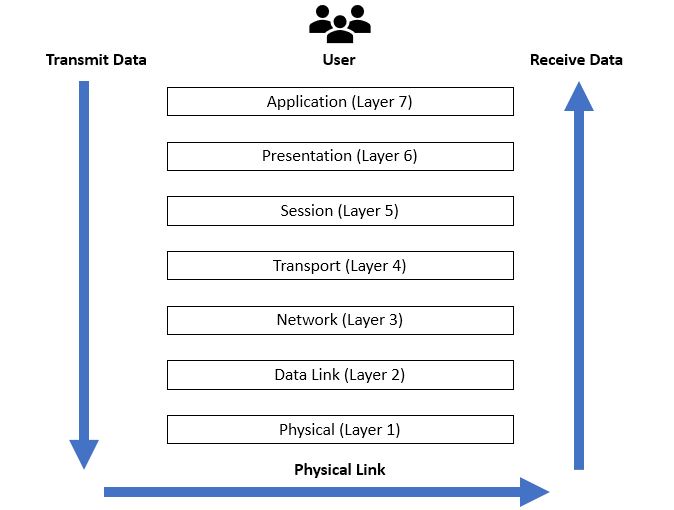 While not in Unit 1, this sets up Unit 5 (Network Configuration) by showing how OS interacts with networking (Image: Ardika6879, CC BY-SA 4.0, via Wikimedia Commons)
In the real world
- eSewa/Khalti: Uses time-sharing OS (Linux) to handle 10,000+ simultaneous transactions via CPU time-slicing, ensuring no user waits longer than 2 seconds for payment confirmation.
- Daraz: Employs batch processing to handle 50,000+ nightly orders during off-peak hours, reducing daytime server load by 40%.
- Ncell: Deploys distributed OS across 50+ telecom towers to reroute calls instantly if a tower fails, maintaining 99.9% uptime.
Based on the TU BITM syllabus for Networking and System Administration (IT271), unit 1.
Discussion
Loading…