Networking and System AdministrationUnit 25 min read
Linux Installation, Boot Process, Package Mgmt & Admin Tools
Unit 2 of Networking and System Administration covers Linux installation methods (text/graphical), boot process stages (BIOS/UEFI → GRUB → kernel → init), package management (RPM, DEB, YUM/DNF, APT), and essential admin tools (top, htop, vmstat, iostat, crontab). Learn how to configure GRUB, manage bootloaders, and tro
Key Concepts and Installation Methods
1. Linux Installation Methods
Linux can be installed using two primary methods:
- Text-based installation: Faster, minimalistic, and preferred for servers or remote installations.
- Graphical installation: User-friendly, ideal for beginners with GUI support.
Worked Example: Installing Linux on a Virtual Machine (VM)
Suppose you are setting up a Linux VM for a web server using VirtualBox or VMware. You would:
- Download an ISO image (e.g., Ubuntu Server 22.04).
- Boot the VM from the ISO.
- Choose "Install Linux" (graphical) or "Text mode setup" (for servers).
- Partition disks (manual or guided), set a root password, and configure networking.
- Complete installation and reboot.
Why? Graphical install is easier for beginners, while text mode is faster for servers.
2. Linux Boot Process
The boot process in Linux involves multiple stages, each critical for system startup. Below is a breakdown:
Stages of Linux Boot Process
stateDiagram-v2
    [*] --> BIOS/UEFI
    BIOS/UEFI --> POST
    POST --> Bootloader
    Bootloader --> Kernel
    Kernel --> Init
    Init --> Systemd
    Systemd --> User Space
User Space --> [*]- BIOS/UEFI: Checks hardware and loads the bootloader.
- Bootloader (GRUB): Loads the kernel and initial RAM disk (initrd).
- Kernel: Takes control, mounts root filesystem, and starts
init. - Init System (systemd): Manages services and starts the user space.
GRUB Configuration
GRUB (Grand Unified Bootloader) allows selecting different kernels or OSes. Key files:
/boot/grub/grub.cfg(auto-generated)/etc/default/grub(manual edits)
Example: Editing GRUB Timeout To delay GRUB menu display for 10 seconds:
sudo nano /etc/default/grub
Change:
GRUB_TIMEOUT=10
Then update GRUB:
sudo update-grub
Why? Useful for troubleshooting boot failures or selecting a fallback kernel.
Package Management Systems
1. Package Formats
Linux uses different package formats:
| Format | Description | Example Commands |
|---|---|---|
| RPM | Red Hat Package Manager (.rpm) |
rpm -ivh package.rpm |
| DEB | Debian Package (.deb) |
dpkg -i package.deb |
| Source Code | Compiled manually | ./configure && make && make install |
2. Package Managers
| Manager | OS Family | Key Commands |
|---|---|---|
| YUM/DNF | RHEL, CentOS | yum install httpd, dnf update |
| APT | Debian, Ubuntu | apt install nginx, apt upgrade |
| Pacman | Arch Linux | pacman -S firefox |
Worked Example: Installing Apache (HTTPD) on CentOS
sudo yum install httpd -y
sudo systemctl start httpd
sudo systemctl enable httpd
Verification:
curl localhost
Why? Ensures web servers are properly installed and running.
Essential System Administration Tools
1. Process Management
| Tool | Purpose | Example Command |
|---|---|---|
top |
Real-time process monitoring | top |
htop |
Interactive process viewer | htop |
ps |
List processes | ps aux |
kill |
Terminate processes | kill -9 PID |
Example: Killing a Hung Process
ps aux | grep "problematic_process"
kill -9 12345
2. System Monitoring
| Tool | Purpose | Example Command |
|---|---|---|
vmstat |
Virtual memory stats | vmstat 2 |
iostat |
I/O stats | iostat -x 1 |
free |
Memory usage | free -h |
df |
Disk usage | df -h |
Example: Checking Disk Usage
df -h /var
Why? Helps diagnose storage bottlenecks.
3. Cron Jobs (Scheduled Tasks)
Cron allows automating tasks. Edit crontab:
crontab -e
Example: Backup Script Daily at 2 AM
0 2 * * * /usr/bin/backup.sh
In the Real World
eSewa (Nepal)
- Uses Linux servers for high availability and security.
- Package managers (APT/YUM) ensure software updates are patched automatically.
- Cron jobs automate transaction logs and backups.
Ncell (Nepal)
- Relies on Linux-based routers for network traffic management.
- GRUB bootloader ensures failover to backup kernels if primary fails.
- System monitoring tools (
top,htop) track server performance in real-time.
Google (Global)
- Uses custom Linux distributions (e.g., Borg) for cluster management.
- Package management automates deployments across thousands of servers.
- Cron alternatives (e.g., Kubernetes CronJobs) handle distributed task scheduling.
Troubleshooting Boot Issues
If Linux fails to boot:
- GRUB Rescue Mode: Run
grub-install /dev/sdXto reinstall GRUB. - Kernel Panic: Check
/var/log/dmesgfor errors. - Missing Initramfs: Rebuild with
dracut --force.
Example: Reinstalling GRUB
sudo grub-install /dev/sda
sudo update-grub
Exam Tip
- Boot Process: Know the 5 stages (BIOS → Bootloader → Kernel → Init → Systemd).
- Package Management: Differentiate between RPM (Red Hat) and DEB (Debian).
- GRUB: Remember
/etc/default/grubandupdate-grub. - Tools:
top,htop,vmstat,crontabare frequently tested. - Real-World Scenarios: Expect questions on server setup (e.g., Ncell routers) or automation (e.g., eSewa backups).
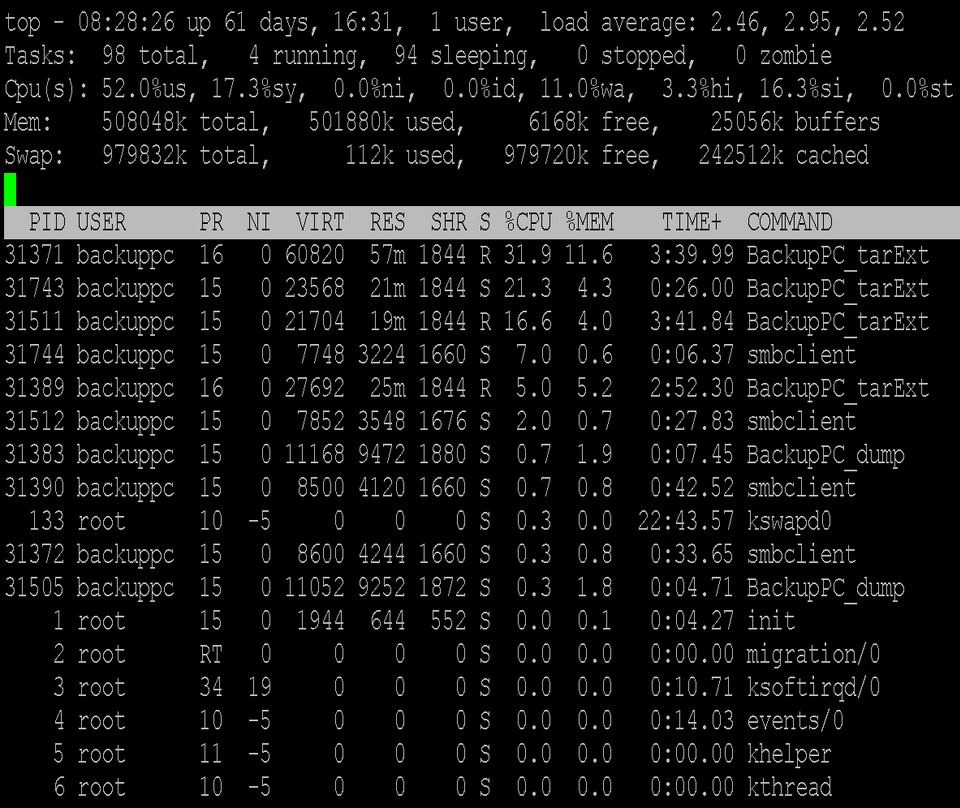 Example of `top` showing CPU, memory, and process usage (Image: Topory, CC BY-SA 4.0, via Wikimedia Commons)
Based on the TU BITM syllabus for Networking and System Administration (IT271), unit 2.
Discussion
Loading…