Computer GraphicsUnit 35 min read
Transformation Techniques: Matrices, Projections, and Coordinate Systems
Unit 3 of Computer Graphics covers homogeneous coordinate systems, 2D/3D transformations (translation, rotation, scaling, reflection), composite transformations, window-viewport mapping, and coordinate system conversions—essential for modeling, animation, and rendering.
## Core Concepts

### 1. **Coordinate Systems and Homogeneous Coordinates**
#### Definitions
- **World Coordinate System (WCS)**: The global reference frame where objects are initially defined.
- **Viewing Coordinate System (VCS)**: The camera-centered frame after transformations.
- **Device Coordinate System (DCS)**: The frame for output (e.g., screen pixels).
- **Homogeneous Coordinates**: Extend 2D/3D points to 3D/4D using a 1 as the last coordinate. Enables matrix multiplication for transformations.

#### Why Homogeneous Coordinates?
```mermaid
graph TD
    A["2D Point (x,y)"] -->|Extend| B["Homogeneous: (x,y,1)"]
    C["3D Point (x,y,z)"] -->|Extend| D["Homogeneous: (x,y,z,1)"]
    B -->|Matrix Multiply| E["Transformed Point"]
    D -->|Matrix Multiply| E
    E -->|Project| F["Screen Coordinates"]
Example: 2D Translation
Convert translation to a matrix: Apply to point :
2. Basic 2D Transformations
Translation
- Matrix:
- Example: Move point by → .
Rotation (θ around origin)
- Matrix:
- Example: Rotate by → .
Scaling (s_x, s_y)
- Matrix:
- Example: Scale by → .
Reflection
- About x-axis:
- About line : Derive using rotation + reflection + inverse rotation (see past exam question).
3. Composite Transformations
Combine transformations by multiplying matrices in reverse order (right-to-left application). Example: Rotate 90° then translate : Apply to :
4. Window-to-Viewport Transformation
Definitions
- Window: Sub-region of WCS to display (e.g., to ).
- Viewport: Target region on screen (e.g., , ).
- Transformation:
Example
Map window to viewport :
- For :
5. Coordinate System Conversions
World → Viewing Coordinate System
- Translation: Move origin to camera position.
- Rotation: Align axes with camera orientation.
- Scaling: Adjust for perspective (optional).
Matrix Form:
Viewing → Device Coordinates
- Perspective Projection: Simulate 3D depth (divide by ).
- Orthographic Projection: Parallel projection (no depth distortion).
Comparison Table:
| Projection | Matrix Form | Use Case |
|---|---|---|
| Orthographic | CAD, 2D games | |
| Perspective | 3D rendering, realism |
6. 3D Transformations
Extend 2D matrices to 4x4:
- Translation:
- Rotation about X-axis (θ):
Example: Rotate point by about X-axis → .
Exam Tip
- Matrix Multiplication Order: Remember transformations are applied right-to-left (e.g.,
T * R * Smeans scale first, then rotate, then translate). - Homogeneous Coordinates: Always use 4D vectors for 3D transformations to avoid errors.
- Window-Viewport: Derive the formula from linear interpolation—examiners love this step.
- Composite Transformations: For past exam questions (e.g., reflection about ), break it into:
- Rotate to align line with axis.
- Reflect.
- Rotate back.
- Diagrams: Sketch the before/after of transformations (e.g., rotation of a square). Label axes and angles.
- Common Pitfalls:
- Forgetting to normalize homogeneous coordinates (divide by ).
- Mixing up orthographic/perspective projection matrices.
- Incorrectly handling negative scales (e.g., reflection).
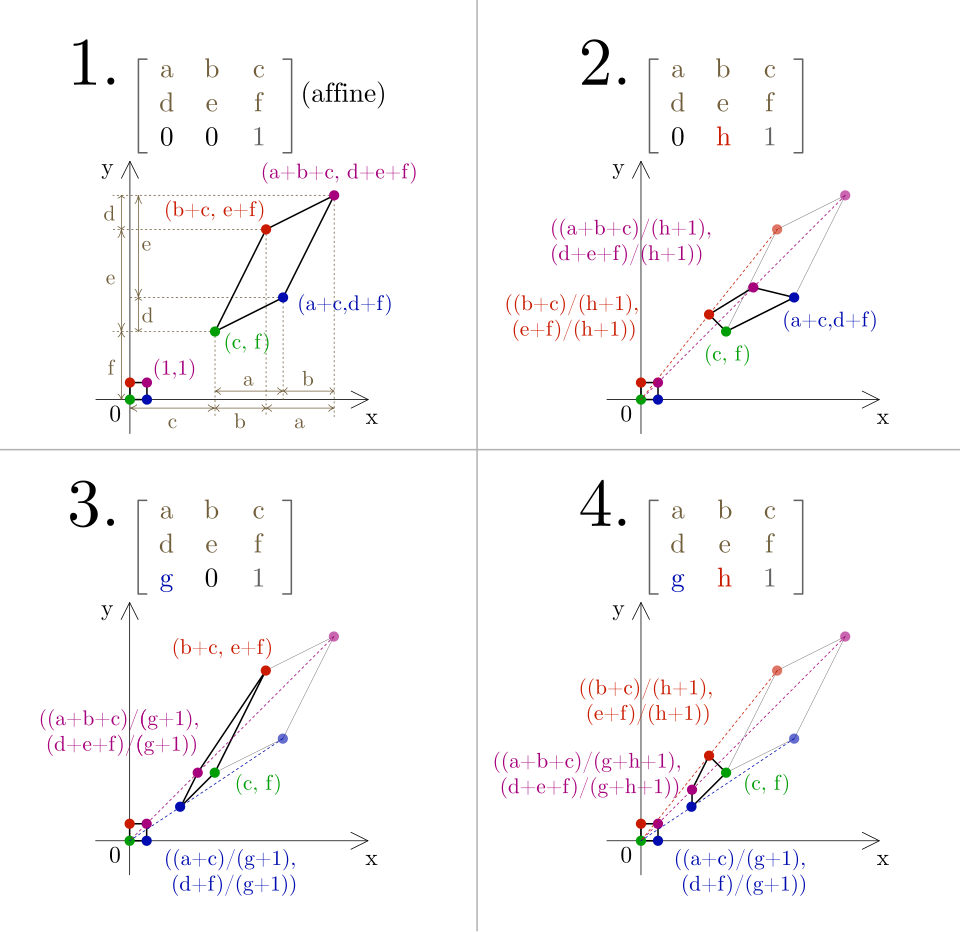 A 4x4 homogeneous transformation matrix with labeled components for translation, rotation, and scaling. (Image: D.stebani, CC BY-SA 4.0, via Wikimedia Commons)
Based on the TU BSc CSIT syllabus for Computer Graphics (CSC214), unit 3.
Discussion
Loading…