Network and System AdministrationUnit 19 min read
Networking Basics: Models, Protocols & Topologies
Unit 1 of Network and System Administration covers foundational networking concepts—OSI/TCP models, protocol types, network topologies, and real-world applications—essential for understanding how data travels across systems.
TAKEAWAYS:
- OSI and TCP models define how data is structured and transmitted in layers, ensuring compatibility across devices.
- Protocols (rules for communication) like TCP/IP govern data exchange, while topologies (physical/logical layouts) determine network efficiency.
- Network types (LAN, WAN, MAN) differ in scope, speed, and use cases (e.g., Ncell’s cellular network vs. NTC’s fiber backbone).
- Worked examples (e.g., tracing a YouTube video request) show how layers/protocols collaborate in real systems.
- Advantages/disadvantages of topologies (e.g., star vs. mesh) impact scalability and fault tolerance.
- Exam focus: Compare models, classify protocols, and analyze topology trade-offs with diagrams.
1. Why Networking Matters
Networks connect devices, enabling data sharing, remote access, and services like online banking (e.g., Nabil Bank’s internet banking uses TCP/IP to securely transmit transactions). Without networking, apps like eSewa (for payments) or Pathao (for ride-hailing) couldn’t function.
2. The OSI Model: 7 Layers of Abstraction
The Open Systems Interconnection (OSI) model standardizes networking into 7 layers, each with a role. Think of it like a postal system:
- Layer 7 (Application): User interfaces (e.g., WhatsApp messages).
- Layer 4 (Transport): End-to-end delivery (TCP/UDP).
- Layer 1 (Physical): Cables, signals (e.g., fiber optics in NTC’s backbone).
graph TD
    A["Layer 7: Application"] --> B["Layer 6: Presentation"]
    B --> C["Layer 5: Session"]
    C --> D["Layer 4: Transport"]
    D --> E["Layer 3: Network"]
    E --> F["Layer 2: Data Link"]
    F --> G["Layer 1: Physical"]
Key Idea: Each layer adds headers/footers to data (a PDU—Protocol Data Unit). For example, an HTTP request (Layer 7) becomes an IP packet (Layer 3) before traveling as bits (Layer 1).
Worked Example: Loading a YouTube Video
- Application Layer: Your browser sends an HTTP request to YouTube’s server.
- Transport Layer: TCP breaks the request into segments and ensures delivery.
- Network Layer: IP addresses route the segments globally.
- Physical Layer: Signals travel via fiber/copper to your ISP.
3. The TCP/IP Model: 4 Layers in Practice
While OSI is theoretical, TCP/IP (used in the internet) combines layers:
- Application (HTTP, FTP)
- Transport (TCP, UDP)
- Internet (IP, routing)
- Network Access (Ethernet, Wi-Fi)
Comparison Table: OSI vs. TCP/IP
| OSI Layer | TCP/IP Equivalent | Protocol Example | Function |
|---|---|---|---|
| Application | Application | HTTP, DNS | User services |
| Transport | Transport | TCP, UDP | Reliable/unreliable delivery |
| Network | Internet | IP, ICMP | Addressing and routing |
| Data Link | Network Access | Ethernet, PPP | Framing and MAC addresses |
Why TCP/IP Wins: Simpler, widely adopted (e.g., Google’s servers use TCP/IP for global data transfer).
4. Protocols: Rules for Communication
Protocols define how devices exchange data. Key types:
- Connection-Oriented (TCP): Guarantees delivery (e.g., file downloads).
- Connectionless (UDP): Faster but no guarantees (e.g., video streaming).
Mermaid Sequence Diagram: TCP Handshake
sequenceDiagram
    participant Client as Your Device
    participant Server as YouTube Server
    Client->>Server: SYN (Connection Request)
    Server-->>Client: SYN-ACK (Acknowledgment)
    Client->>Server: ACK (Confirm)
    Note right of Server: Connection Established
    Client->>Server: HTTP Request
    Server-->>Client: Video Data (TCP Segments)
Real-World Use: WhatsApp uses UDP for voice calls (low latency) but TCP for messages (reliability).
5. Network Topologies: How Devices Connect
Topologies affect performance, cost, and scalability. Common types:
graph TD
  A["Bus Topology"] -->|"Single cable, linear"| B["All devices share a single backbone"]
  C["Star Topology"] -->|"Central hub"| D["All devices connected to a central switch/router"]
  E["Mesh Topology"] -->|"Redundant connections"| F["Every device connected to multiple others"]
  G["Ring Topology"] -->|"Closed loop"| H["Devices connected in a circular path, token passing"]
Advantages/Disadvantages
| Topology | Pros | Cons | Use Case |
|---|---|---|---|
| Star | Easy to manage, fault isolation | Single point of failure (hub) | Home/office networks |
| Mesh | High redundancy, scalable | Expensive, complex setup | Ncell’s 4G/5G base stations |
| Bus | Low cost | Single cable failure crashes all | Legacy networks (rare today) |
Worked Example: Kathmandu Traffic as a Network
- Star: All roads converge at Durbar Square (bottleneck).
- Mesh: Ring road + flyovers reduce congestion (like a mesh network).
6. Network Types: LAN, WAN, MAN
| Type | Scope | Speed | Example | Protocol |
|---|---|---|---|---|
| LAN | Building/campus | 1 Gbps–10 Gbps | TU’s internal network | Ethernet, Wi-Fi |
| WAN | Global | 1 Mbps–10 Gbps | Internet (ISP connections) | TCP/IP, MPLS |
| MAN | City-wide | 100 Mbps–1 Gbps | NTC’s fiber backbone | ATM, Frame Relay |
Real-World Tie-In:
- Daraz’s Order Fulfillment: Uses a LAN for warehouse inventory systems and a WAN to connect to global suppliers.
- NEPSE Stock Exchange: Relies on a MAN for low-latency trading between brokers.
7. Physical Media: How Data Travels
Data moves via guided (cables) or unguided (wireless) media.
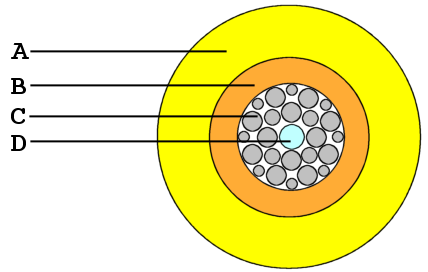 A labeled diagram showing the core, cladding, and protective layers. (Image: J.P.Lon at English Wikipedia, CC BY 2.5, via Openverse)
Worked Example: NTC’s Fiber Optic Network
- Why Fiber?: Higher bandwidth (100+ Tbps), immune to electromagnetic interference.
- Use: Backbone for eSewa payments (low latency = faster transactions).
8. Addressing: IP and MAC
- IP Address: Logical address (e.g.,
192.168.1.1) for routing. - MAC Address: Physical address (e.g.,
00:1A:2B:3C:4D:5E) for local delivery.
Mermaid ER Diagram: Addressing in a LAN
Real-World Use: Khalti’s Payment Gateway
- Your phone’s MAC connects to the local router.
- The router uses your public IP to route payment data to Khalti’s servers.
In the Real World
eSewa Payments:
- Layers Used: Application (HTTPS), Transport (TCP), Network (IP routing).
- Topology: Star (your device → ISP → eSewa servers).
- Media: Fiber optic for backbone, copper/Wi-Fi for last-mile.
Pathao Ride-Hailing:
- Protocols: UDP for real-time GPS updates, TCP for booking confirmations.
- Network Type: WAN (global driver-user matching).
NTC’s Internet Service:
- Topology: Mesh of fiber nodes for redundancy.
- Media: Fiber optic cables (e.g., between Kathmandu and Pokhara).
Exam Tip
Diagrams Are Key:
- Draw OSI/TCP layers with PDUs labeled.
- Sketch topologies (star/mesh) with devices and connections.
- Use sequence diagrams for protocol handshakes (e.g., TCP, DNS).
Compare and Contrast:
- OSI vs. TCP/IP: "OSI is theoretical; TCP/IP is practical."
- Topologies: "Star is cheap but has a single point of failure; mesh is expensive but redundant."
Worked Examples:
- Always relate to Nepali services (eSewa, Ncell, NTC) or global apps (Google, WhatsApp).
- Example: "Trace how a YouTube video request travels through OSI layers."
Common Pitfalls:
- Confusing TCP/UDP: TCP is reliable (e.g., file downloads); UDP is fast (e.g., video calls).
- IP vs. MAC: IP is for routing; MAC is for local delivery.
- Topology Misuse: Don’t use bus topology for modern networks (single point of failure).
Short-Answer Focus:
- Define: "OSI model," "protocol," "LAN."
- Explain: "Why is TCP connection-oriented?" → "To ensure data arrives intact."
- Compare: "Star vs. mesh topology" → Use a table with pros/cons.
Final Visual Summary
Based on the TU BSc CSIT syllabus for Network and System Administration, unit 1.
Discussion
Loading…