Introduction To PsychologyUnit 38 min read
Sensation & Perception: How We See, Hear, and Understand the World
Unit 3 of Introduction to Psychology explores how raw sensory input (sensation) is transformed into meaningful experiences (perception), covering mechanisms, biases, and real-world applications like eSewa’s visual cues or Pathao’s route perception.
TAKEAWAYS:
- Sensation is the detection of physical stimuli (light, sound, touch) via sensory organs, while perception is the brain’s interpretation of those signals.
- Perceptual constancies (e.g., size, shape, brightness) let us recognize objects despite changing sensory input.
- Bottom-up processing uses raw sensory data, while top-down processing relies on prior knowledge (e.g., seeing a "face" in clouds).
- Factors like context, culture, and expectations distort perception (e.g., optical illusions, eSewa’s interface design).
- Gestalt principles (proximity, similarity) explain how we group stimuli into coherent patterns (e.g., traffic signs).
- Perception errors (e.g., illusions) reveal how the brain fills gaps in sensory data.
1. Sensation: The First Step
Sensation is the process where sensory receptors (eyes, ears, skin) detect physical energy from the environment and convert it into neural signals. These signals travel to the brain via sensory pathways.
How Sensation Works: The Pathway
Example: When you smell coffee, odor molecules bind to receptors in your nose, triggering nerve impulses to your brain, which interprets the smell as "coffee."
2. Perception: Making Sense of Sensation
Perception is the brain’s active process of organizing and interpreting sensory input. It’s not just passive—it involves expectations, memories, and context.
Key Concepts
- Perceptual Constancies: Our ability to recognize objects despite changes in sensory input.
- Size Constancy: A car looks smaller when far away but we know it’s the same size.
- Shape Constancy: A door appears rectangular even when viewed at an angle.
- Brightness Constancy: A white shirt looks white under different lighting.
Why? The brain compensates for distance, angle, and lighting to maintain a stable perception.
3. Bottom-Up vs. Top-Down Processing
Two main ways the brain processes sensory information:
| Bottom-Up Processing | Top-Down Processing |
|---|---|
| Starts with raw sensory data (e.g., edges, colors). | Uses prior knowledge and expectations. |
| Example: Recognizing a face from scattered pixels. | Example: Seeing a "cat" in a blurry photo due to past experience. |
| Slow but precise. | Fast but prone to errors (e.g., optical illusions). |
Real-World Tie:
- eSewa App: Bottom-up processing helps users recognize buttons (size, color) while top-down processing lets them quickly find the "Pay" option based on past use.
4. Factors Influencing Perception
Perception is never neutral—it’s shaped by:
A. Context
- Example: A shadow on a wall might look like a cat in a dark room but a stain in daylight.
B. Culture
- Example: Nepali people may perceive "smiling" differently in photos than Westerners due to cultural norms.
C. Expectations
- Example: The Müller-Lyer illusion tricks us into perceiving lines as unequal because of arrowheads (a cultural artifact of architecture).
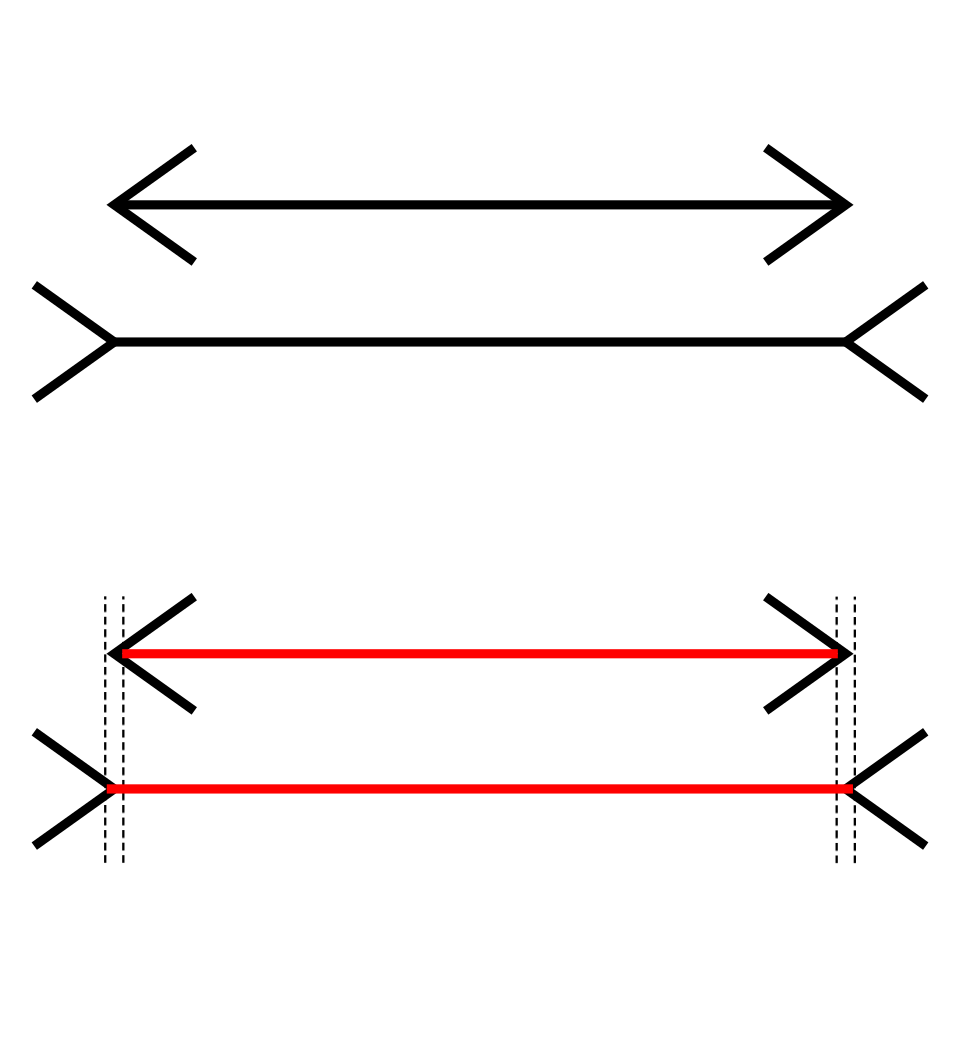 Two lines of equal length appear different due to arrowhead cues. (Search: Muller-Lyer illusion labelled diagram) (Image: Subsidiary account, Public domain, via Wikimedia Commons)
D. Motivation & Emotion
- Example: A hungry person might "see" food more vividly (e.g., smelling pizza triggers stronger perception).
E. Social Influence
- Example: In a group, people may perceive a situation as "dangerous" if others react fearfully (e.g., a loud noise in a crowd).
5. Principles of Perceptual Organization (Gestalt Laws)
The brain groups stimuli into meaningful patterns using Gestalt principles:
graph TD
  A["Proximity"] -->|"Objects close together are grouped"| B["Example: Traffic signs (e.g., speed limit)"]
  C["Similarity"] -->|"Similar shapes/colors"| D["Example: Daraz’s product grid (uniform tiles)"]
  E["Good Continuation"] -->|"Lines follow smooth paths"| F["Example: Road signs (arrows)"]
  G["Closure"] -->|"Brain fills gaps"| H["Example: Ncell logo (incomplete circle)"]
  I["Figure-Ground"] -->|"Distinguishing object from background"| J["Example: Pathao app icon (foreground vs. background)"]
Worked Example: Daraz’s Product Grid
- Proximity: Products are grouped by category (e.g., electronics in one section).
- Similarity: Items with similar colors/shapes (e.g., phones) are clustered.
- Closure: The brain fills gaps in incomplete product images (e.g., blurred photos).
6. Perceptual Errors & Illusions
The brain’s shortcuts sometimes lead to mistakes:
| Illusion Type | Example | Why It Happens |
|---|---|---|
| Optical | Ponzo illusion (rails converging) | Misjudging depth due to forced perspective. |
| Cognitive | Ambiguous figures (Necker cube) | Brain switches between interpretations. |
| Physiological | Afterimages (staring at a red dot) | Retinal fatigue tricks the brain. |
Real-World Impact:
- NTC’s Traffic Lights: Designed to avoid confusion (e.g., red/green contrast for quick perception).
- Banks’ ATMs: Use clear spacing (proximity) to avoid button-pressing errors.
7. Sensation vs. Perception: A Worked Example
Scenario: You’re at a NEPSE trading floor and see a stock price flash on a screen.
- Sensation: Your eyes detect light waves (rods/cones in the retina).
- Transduction: Retinal cells convert light into neural signals.
- Perception:
- Bottom-up: Recognize digits (e.g., "123.45") from raw pixels.
- Top-down: Use prior knowledge of stock symbols to interpret the change as "rise" or "fall."
- Constancy: The brain adjusts for screen brightness (brightness constancy).
Why It Matters: Traders rely on quick, accurate perception—a misperceived dip could lead to costly errors.
In the Real World
eSewa’s UI Design
- Uses proximity (buttons grouped by function) and closure (icons like a wallet for "Balance") to reduce user confusion.
- Top-down processing helps users find "Pay Bill" faster with repeated use.
Pathao’s Route Planning
- Bottom-up processing detects traffic signs (colors, shapes) while driving.
- Gestalt’s good continuation helps the brain follow winding roads smoothly.
Ncell’s Logo
- Closure principle: The incomplete circle in Ncell’s logo is perceived as a full circle due to the brain’s tendency to fill gaps.
Exam Tip
- For perceptual constancies: Always link to real-life examples (e.g., "A door looks rectangular even when viewed at an angle because of shape constancy").
- For bottom-up vs. top-down: Use eSewa/Khalti apps to explain how raw data (buttons) meets user expectations (quick payment).
- For illusions: Describe how they work (e.g., "The Müller-Lyer illusion tricks us because arrowheads create depth cues") and why they matter (e.g., "Designers avoid them in ATMs to prevent errors").
- For Gestalt principles: Always pair with visual examples (e.g., "Daraz’s product grid uses similarity to group phones").
- Avoid: Vague answers like "perception is subjective." Instead, say:
"Perception is influenced by context (e.g., a shadow may look like a cat in darkness) and culture (e.g., Nepali vs. Western smiles)."
Key Formula for Full Marks:
- Define (e.g., "Perceptual constancy is...").
- Explain (e.g., "The brain adjusts for distance...").
- Example (e.g., "Like a car looking small but being known as the same size").
- Real-world link (e.g., "Used in eSewa’s button design for clarity").
Based on the TU BSW syllabus for Introduction To Psychology, unit 3.
Discussion
Loading…