Computer NetworksUnit 413 min read
Data Link Layer: Framing, MAC, LLC, Error Control & Switching
Unit 4 of Computer Networks explores the Data Link Layer (Layer 2), covering framing techniques, MAC sublayer protocols (Ethernet, PPP), LLC sublayer functions, error detection (CRC), flow control, and switching (bridges, switches). It explains how devices communicate reliably over shared or dedicated media, including
TAKEAWAYS:
- The Data Link Layer is divided into MAC (Media Access Control) and LLC (Logical Link Control) sublayers, handling framing, addressing, and error control.
- Ethernet dominates wired LANs, using CSMA/CD (half-duplex) or full-duplex modes with Gigabit speeds, while PPP is used in point-to-point links (e.g., dial-up, DSL).
- Error detection relies on CRC (Cyclic Redundancy Check), while flow control uses mechanisms like stop-and-wait or sliding window.
- Switches use MAC address tables to forward frames efficiently, unlike hubs that broadcast to all ports.
- Topologies (bus, star, ring) and encoding (Manchester, NRZ) determine how signals are transmitted over physical media.
- Real-world applications include Wi-Fi (CSMA/CA), ATM networks (cell switching), and Ethernet in home/office networks.
1. Overview of the Data Link Layer
The Data Link Layer (Layer 2) is responsible for:
- Framing: Encapsulating network layer packets into frames.
- Physical addressing: Using MAC addresses (48-bit) to identify devices.
- Flow control: Managing data transmission rates between devices.
- Error control: Detecting and correcting errors in transmitted frames.
- Access control: Regulating how devices share the medium (e.g., Ethernet, Wi-Fi).
It is divided into two sublayers:
- MAC (Media Access Control) sublayer: Handles hardware-dependent functions (e.g., Ethernet, Wi-Fi).
- LLC (Logical Link Control) sublayer: Provides an interface between the MAC and network layer (e.g., IP).
classDiagram
    class DataLinkLayer {
        +Framing
        +MAC Addressing
        +Error Control (CRC)
        +Flow Control (Stop-and-Wait, Sliding Window)
        +Access Control (CSMA/CD, CSMA/CA)
    }
    class MAC {
        +Hardware-dependent (Ethernet, Wi-Fi)
        +CSMA/CD (Ethernet)
        +CSMA/CA (Wi-Fi)
    }
    class LLC {
        +Logical Link Control
        +Interface to Network Layer (IP)
        +Flow & Error Control (optional)
    }
    DataLinkLayer <|-- MAC
    DataLinkLayer <|-- LLC
2. Framing and MAC Addressing
Frame Structure
A frame consists of:
- Preamble: Synchronizes sender and receiver clocks (7 bytes in Ethernet).
- Start Frame Delimiter (SFD): Marks the start of the frame (1 byte).
- Destination MAC Address: 6-byte address of the receiver.
- Source MAC Address: 6-byte address of the sender.
- Type/Length: Indicates the protocol (e.g., IPv4 =
0x0800). - Payload (Data): Network layer packet (e.g., IP datagram).
- Frame Check Sequence (FCS): CRC for error detection (4 bytes).
MAC Addresses
- 48-bit (6-byte) address: Assigned by manufacturers (e.g.,
00:1A:2B:3C:4D:5E). - First 3 bytes (OUI): Vendor identifier (e.g.,
00:1A:2Bfor Cisco). - Last 3 bytes: Device-specific identifier.
- Unicast, Broadcast, Multicast:
- Unicast: One-to-one communication (e.g.,
FF:FF:FF:FF:FF:FFis broadcast). - Multicast: One-to-many (used in streaming, e.g.,
01:00:5E:00:00:01).
- Unicast: One-to-one communication (e.g.,
Example:
If a laptop (00:1A:2B:3C:4D:5E) sends a frame to a router (00:1B:2C:3D:4E:5F), the frame’s Destination MAC is 00:1B:2C:3D:4E:5F, and the Source MAC is 00:1A:2B:3C:4D:5E.
3. Medium Access Control (MAC) Protocols
Ethernet (IEEE 802.3)
- Half-Duplex Mode:
- Devices take turns transmitting (collision possible).
- Uses CSMA/CD (Carrier Sense Multiple Access with Collision Detection).
- If a collision occurs, devices wait a random time before retrying.
- Full-Duplex Mode:
- Devices transmit and receive simultaneously (no collisions).
- Requires switches (not hubs).
- Topology:
- Bus: All devices share a single cable (obsolete).
- Star: Devices connect to a central hub/switch (most common).
- Ring: Devices in a circular topology (e.g., Token Ring, obsolete).
- Encoding:
- Manchester Encoding: Transitions in the middle of the bit (e.g.,
1=0→1,0=1→0). - NRZ (Non-Return to Zero): Simpler but prone to errors.
- Manchester Encoding: Transitions in the middle of the bit (e.g.,
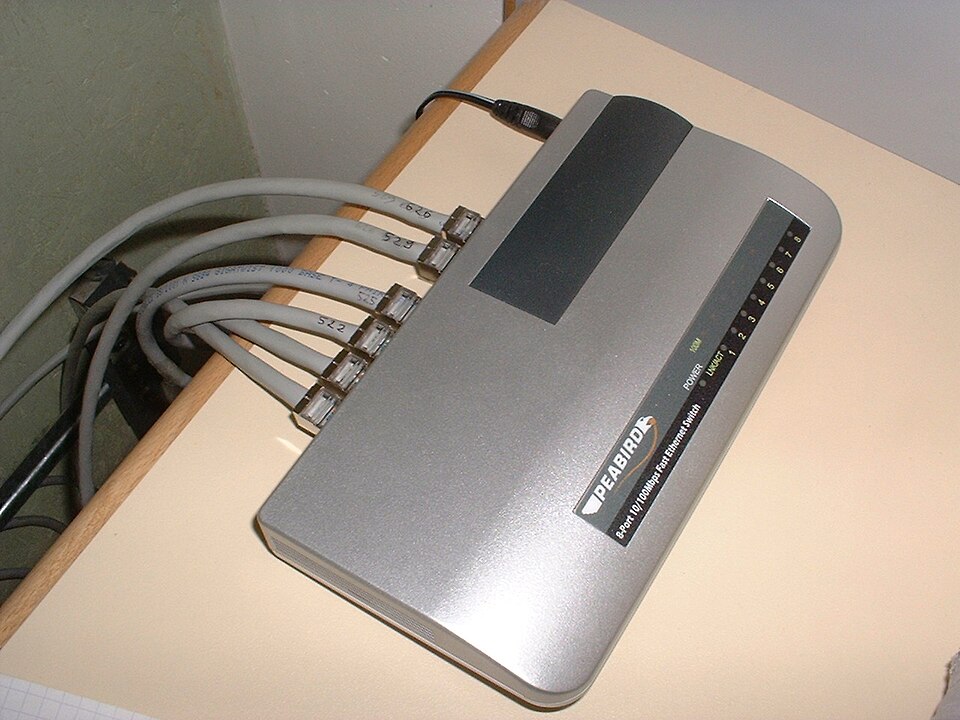 A real Gigabit Ethernet switch with RJ45 ports and a twisted-pair cable. (Image: Syced, CC0, via Wikimedia Commons)
PPP (Point-to-Point Protocol)
- Used in dial-up, DSL, and leased lines.
- Provides error detection (CRC), compression, and authentication.
- Frame structure:
- Flag (1 byte):
0x7E(start/end of frame). - Address (1 byte):
0xFF(broadcast). - Control (1 byte):
0x03(unnumbered frame). - Protocol (1 byte): Indicates payload type (e.g.,
0xC021for IP). - Payload: Network layer packet.
- FCS (2 bytes): CRC-16.
- Flag (1 byte):
4. Error Detection and Flow Control
Cyclic Redundancy Check (CRC)
- How it works:
- Sender appends a CRC remainder to the frame.
- Receiver recalculates CRC and compares it with the received remainder.
- If they match, the frame is error-free; otherwise, it is discarded.
- Common CRC polynomials:
- CRC-32 (used in Ethernet).
- CRC-16 (used in PPP).
Example (CRC-4 for simplicity):
- Data:
1011(binary). - Divisor:
1011(CRC-4 polynomial). - Sender appends
0000→10110000. - After division, remainder is
1100→ transmitted as10111100. - Receiver divides
10111100by1011→ remainder0000→ no error.
Flow Control Mechanisms
- Stop-and-Wait:
- Sender waits for an ACK before transmitting the next frame.
- Inefficient for high-speed links.
- Sliding Window:
- Sender transmits multiple frames before waiting for ACKs.
- Window size determines how many unacknowledged frames can be sent.
- Used in HDLC (High-Level Data Link Control).
sequenceDiagram
    participant Sender
    participant Receiver
    Sender->>Receiver: Frame 1
    Receiver-->>Sender: ACK 1
    Sender->>Receiver: Frame 2
    Receiver-->>Sender: ACK 2
    Note over Sender,Receiver: Stop-and-Wait
5. Switching and Bridging
Hub vs. Switch
| Feature | Hub | Switch |
|---|---|---|
| Operation | Broadcasts to all ports | Forwards to specific port |
| Collision | Yes (half-duplex) | No (full-duplex) |
| Performance | Low (shared bandwidth) | High (dedicated bandwidth) |
| MAC Table | None | Learns MAC addresses |
How a Switch Works
- Learning: Switch builds a MAC address table by noting which port each MAC address is connected to.
- Forwarding: If the destination MAC is in the table, the frame is sent only to that port.
- Flooding: If the MAC is unknown, the frame is broadcast to all ports (except the incoming port).
Example:
- Port 1: Laptop (
00:1A:2B:3C:4D:5E). - Port 2: Printer (
00:1B:2C:3D:4E:5F). - If the laptop sends a frame to the printer, the switch forwards it only to Port 2.
6. Real-World Applications
1. Gigabit Ethernet in Home/Office Networks
- How it uses this unit:
- MAC sublayer: Uses CSMA/CD (half-duplex) or full-duplex (switch-based).
- Framing: Encapsulates IP packets into Ethernet frames (with FCS for error detection).
- Topology: Star topology with switches.
- Encoding: Manchester encoding for clock synchronization.
- Example:
- When you stream a video from YouTube, your router (a switch) forwards frames to your laptop using MAC addresses. If two devices try to send data simultaneously (half-duplex), CSMA/CD detects collisions and retries.
2. Wi-Fi (IEEE 802.11) in Pathao or Ncell Networks
- How it uses this unit:
- MAC sublayer: Uses CSMA/CA (Carrier Sense Multiple Access with Collision Avoidance) to avoid collisions (unlike Ethernet’s CSMA/CD).
- Framing: Wi-Fi frames include MAC headers for source/destination addresses.
- Error control: Uses CRC-32 in the FCS field.
- Example:
- When a Pathao rider sends a delivery confirmation, their phone’s Wi-Fi chip uses CSMA/CA to check if the medium is free before transmitting. If another device is transmitting, it waits a random backoff time.
3. ATM (Asynchronous Transfer Mode) in NTC Networks
- How it uses this unit:
- Cell switching: ATM divides data into fixed-size cells (53 bytes) for efficient switching.
- MAC addressing: Uses VPI/VCI (Virtual Path Identifier/Virtual Channel Identifier) instead of MAC addresses.
- Error detection: Uses HEC (Header Error Control) in the cell header.
- Example:
- NTC’s fiber-optic backbone uses ATM to prioritize voice and video traffic by assigning different VPI/VCI values.
7. Worked Example: Ethernet Frame Transmission
Scenario:
A laptop (MAC: 00:1A:2B:3C:4D:5E) sends an HTTP request to a server (MAC: 00:1B:2C:3D:4E:5F) on a Gigabit Ethernet network.
Steps:
Framing:
- Preamble:
7 bytes(for synchronization). - SFD:
1 byte(0xAB). - Dest. MAC:
00:1B:2C:3D:4E:5F. - Source MAC:
00:1A:2B:3C:4D:5E. - Type:
0x0800(IPv4). - Payload: HTTP request (e.g.,
GET /index.html). - FCS: CRC-32 of the frame (e.g.,
0xABCD1234).
- Preamble:
Transmission:
- If the network is half-duplex, the laptop uses CSMA/CD:
- It senses the medium (no traffic) → transmits.
- If a collision occurs (e.g., another device sends data), it waits a random time (
0to2^n - 1slots) before retrying.
- If the network is full-duplex (switch-based), no collisions occur.
- If the network is half-duplex, the laptop uses CSMA/CD:
Switch Forwarding:
- The switch learns:
00:1A:2B:3C:4D:5E→ Port 1 (laptop).00:1B:2C:3D:4E:5F→ Port 2 (server).
- It forwards the frame only to Port 2.
- The switch learns:
Error Detection:
- The server recalculates CRC and compares it with the received FCS.
- If they match, it processes the HTTP request; otherwise, it discards the frame.
8. Drawbacks of IPv4 (Bonus: Relevant to Exam)
While not directly part of the Data Link Layer, IPv4’s limitations are often tested alongside Layer 2 concepts (e.g., NAT, subnetting). Key drawbacks:
- Limited Address Space: Only ~4.3 billion addresses (exhausted due to growth).
- No Built-in Security: Vulnerable to spoofing, sniffing (requires IPSec or firewalls).
- No QoS Support: Treats all traffic equally (voice/video suffer in congestion).
- Complex Subnetting: Manual configuration leads to errors.
How Data Link Layer Helps Mitigate Some Issues:
- NAT (Network Address Translation): Uses MAC addresses to map private IPv4 addresses to a public one (e.g., home routers).
- VLANs (Virtual LANs): Switches use MAC tables to segment traffic, improving security and performance.
Exam Tip
Diagrams are Mandatory:
- Draw Ethernet frame structure, PPP frame, and switch MAC table in exams.
- Label all fields (e.g., Preamble, FCS, MAC addresses).
Compare Half-Duplex vs. Full-Duplex:
- Half-duplex: CSMA/CD, collisions, shared medium (e.g., old Ethernet with hubs).
- Full-duplex: No collisions, dedicated bandwidth (e.g., switch-based networks).
CRC Calculation:
- Practice CRC-4 or CRC-8 examples. Show step-by-step division.
- Example question: "Calculate the CRC-4 remainder for data
1101using divisor1011."
Real-World Scenarios:
- Relate switches to home/office networks (e.g., "Why does my router have multiple Ethernet ports?").
- Explain Wi-Fi collisions using CSMA/CA (vs. Ethernet’s CSMA/CD).
Common Pitfalls:
- Confusing MAC and IP addresses: MAC is Layer 2 (hardware), IP is Layer 3 (software).
- Forgetting FCS: Always include it in frame diagrams.
- Topology mistakes: Bus = shared cable; Star = switch/hub; Ring = token passing.
Final Note: The Data Link Layer is the bridge between physical transmission and logical networking. Master framing, MAC addressing, error control, and switching—these are the building blocks for all wired and wireless networks you’ll encounter in exams and real-world systems like eSewa payments (secure MAC-based authentication), Daraz order routing (switches), and Ncell’s mobile data (PPP over cellular links).
Based on the PU BE Computer (PU) syllabus for Computer Networks, unit 4.
Discussion
Loading…